
Yes, you can get usable, real-time translation while driving, but only with the right kind of app. Look for hands-free activation, automotive-grade noise suppression, and low-latency two-way conversation mode. Skip anything that needs you to type or tap. Hands-free voice mode designed for in-car use is key here, and it's worth testing your chosen app on your next ride before relying on it for a real conversation.
TL;DR:
- Automotive-grade noise suppression and hands-free activation are essential for effective real-time translation while driving.
- Hybrid processing, combining on-device recognition with cloud translation, provides the best balance of speed and accuracy in noisy environments.
- Testing the app with your specific language pair and environment before a trip helps ensure reliability and comprehension.
- Using Bluetooth audio and microphone routing properly minimizes distractions and maintains clear conversation flow.
- Expect reduced accuracy at high speeds, in heavy traffic, or with multiple speakers, so keep exchanges short and manageable.
Table of Contents
- How In-Car Voice Translation Actually Works
- What to Look for in a Driving Voice Translator
- Is It Safe to Use a Voice Translator While Driving?
- How to Set Up a Voice Translator for Driving
- Why Oralingo Fits Hands-Free, In-Car Translation
- Battery Life and Power Considerations During Driving
- Connecting Your Translator to Car Audio and Infotainment
- Author Perspective: What Actually Changes Next
- Try Oralingo Hands-Free on Your Next Drive
- Sources
- FAQ
How In-Car Voice Translation Actually Works
Every voice translator you'll use in a car runs the same basic pipeline. Automatic speech recognition (ASR) turns your spoken words into text. Natural language understanding (NLU) figures out what you meant, not just what you said. Text-to-speech (TTS) turns the translated result back into audio your passenger or driver can hear. That chain has to happen in under a second or two, or the conversation stops feeling natural.
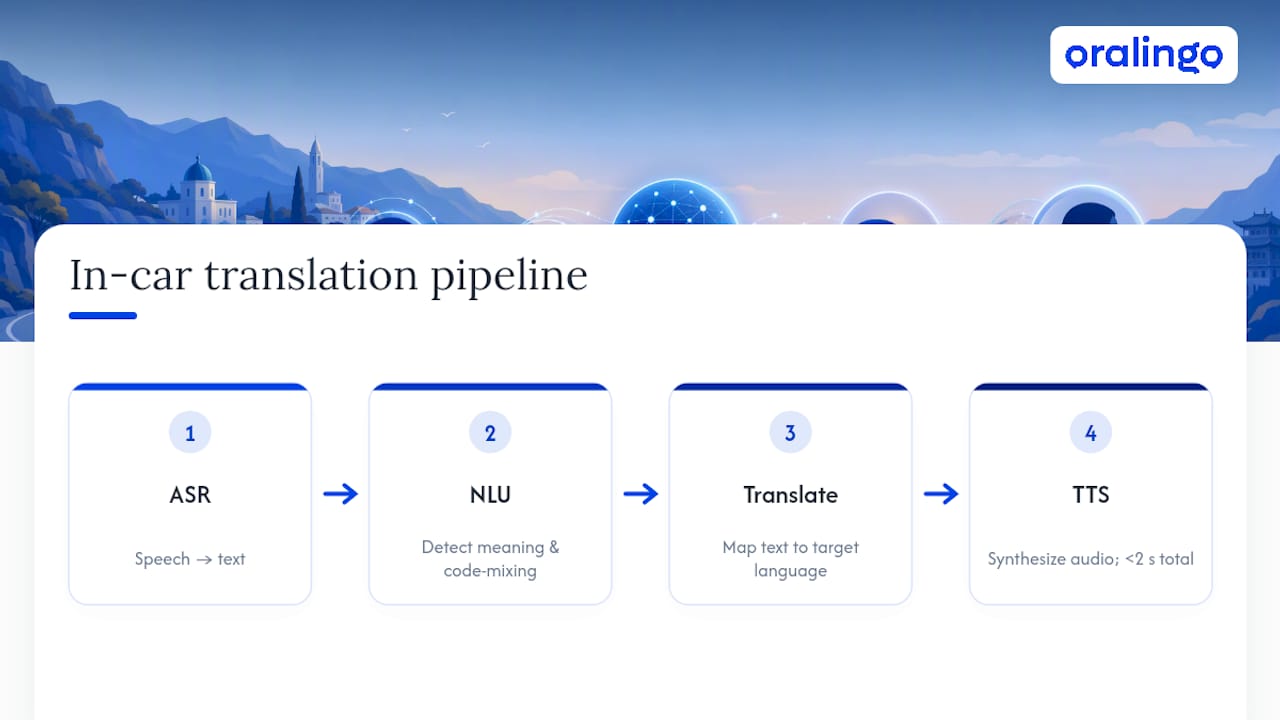
Cars make that harder than any other environment. Engine noise, wind, road vibration, HVAC fans, and passenger chatter all stack on top of each other, creating what researchers call acoustic complexity, the real reason generic phone assistants stumble in moving vehicles. A translator built for a quiet living room often falls apart at 65 miles per hour with the windows cracked.
This is where processing location matters. On-device systems handle wake-word detection and basic commands instantly, with no signal delay, but they have less raw power for nuanced translation. Cloud processing handles the heavy lifting, richer vocabulary, better context, more accurate phrasing, but it depends on your connection. The strongest systems use a hybrid: automotive-grade voice assistants keep safety-critical functions local and send complex translation tasks to the cloud only when the connection allows it.
Real conversations rarely stay in one language. Code-mixing, a driver switching between English and Spanish mid-sentence, for example, trips up systems that expect clean, single-language input. Good language detection catches the switch instead of garbling the output.
What to Look for in a Driving Voice Translator
Not every translation app is built for a moving vehicle. Some prioritize typing accuracy over spoken conversation. Some assume you're standing still in a quiet room. Here's what actually matters when you're behind the wheel:
- Noise suppression and echo cancellation. This is non-negotiable. Without automotive-grade filtering, road and cabin noise will wreck recognition accuracy before the app even gets to translating.
- Hands-free activation. A wake word, a steering-wheel button, or automatic Bluetooth pairing beats reaching for your phone every time. Your eyes belong on the road, not your screen.
- Low-latency, two-way conversation mode. You want back-and-forth speech handled in near real time, not a translate-and-wait cycle that kills the flow of talking to your rider or passenger.
- Offline or on-device fallback. Tunnels, rural highways, and dead zones happen. A translator that can still handle basic phrases without a signal is far more reliable on long drives.
- Real language coverage, tested, not assumed. A vendor claiming dozens of languages doesn't guarantee your specific pair works well. Run a few sample phrases before you trust it with a client or a stranger in your back seat.
- Clear privacy and encryption practices. If you're translating anything sensitive, a business call, a medical detail, confirm how the app handles your audio before you rely on it.
Pro Tip: Test your language pair with a two-minute conversation before your first real trip. If it stumbles on simple phrases in a quiet parking lot, it will stumble worse on the highway.
Is It Safe to Use a Voice Translator While Driving?
Safety comes down to one rule: keep your hands on the wheel and your eyes on the road, full stop. Route audio through your car's speakers or a Bluetooth headset instead of holding the phone to your ear. Short, predictable exchanges work far better than long, rambling conversations that pull your attention away from traffic.
Even the best app has limits. Accuracy tends to drop in heavy traffic, with multiple people talking at once, or at highway speeds where wind and road noise spike. Set that expectation before you rely on a translator for anything important.
- Use hands-free audio only, never hold the phone
- Keep exchanges short: one phrase, one response, repeat
- Expect more errors in crowded, noisy, or fast-moving conditions
Distraction is not a small risk. The National Highway Traffic Safety Administration has repeatedly flagged distracted driving as a factor in thousands of fatal crashes every year, part of why most states now restrict handheld phone use behind the wheel. Check your local distracted-driving laws before you use any app, translator included, and stick to voice-only operation.
How to Set Up a Voice Translator for Driving
Getting a hands-free translator ready takes a few minutes, and it's worth doing before you're relying on it mid-trip.
- Install the app and grant permissions. Allow microphone access and enable hands-free or voice mode in settings before you start driving.
- Pair your phone to your car's audio system. Confirm the app is pulling from the right microphone, either your phone's mic or your car's built-in array, not a headset you left disconnected.
- Run a short test. Speak two or three common phrases and check both the delay and the translation quality before you need it for a real conversation.
- Troubleshoot as needed. If accuracy is off, lower your media volume, adjust microphone gain in settings, or switch to single-speaker mode if multiple people are talking at once.
Testing your setup this way lines up with what most live translation tools recommend: a quick in-situ check beats trusting an app cold on your first real trip.
Pro Tip: Pre-save a handful of common phrases, greetings, directions, payment confirmations, so you have a fallback if live translation lags. Short, simple confirmation responses like "yes" or "got it" also reduce the chance of mistranslation.
If you want a deeper walkthrough of latency troubleshooting, testing multilingual voice chat in a short session before you drive is one of the fastest ways to catch problems early.
Why Oralingo Fits Hands-Free, In-Car Translation
Some translation apps are built around hands-free voice mode, which matters most when your hands need to stay on the wheel. Top apps support many languages, translate conversations in near real time, and encrypt every conversation end-to-end to help keep sensitive business calls or private family conversations secure.
Before you rely on it for a real trip, run a few quick checks:
- Test your actual language pair with a short back-and-forth, not just a single word
- Check latency on your own carrier and connection, not just on Wi-Fi
- Confirm Bluetooth audio is routing correctly to your car speakers or headset
- Review the app's privacy settings if you plan to discuss anything confidential
Oralingo's context-aware translation is designed to hold onto the thread of a conversation instead of translating each phrase in isolation, which matters more in a car, where exchanges tend to be short and quick. Start with the free tier and run a few in-car tests before you decide whether to upgrade.
Battery Life and Power Considerations During Driving
Live translation is not light work for your phone. Continuous microphone input, real-time processing, and audio output all pull power, especially if the screen stays on or the app runs alongside navigation.
A few habits make a real difference on longer drives. Keep your phone plugged into a car charger any time you're using a translator for an extended trip. Dim your screen or let it sleep since voice mode doesn't need the display active once it's running. Close other apps competing for processing power, particularly navigation apps doing their own constant GPS and rendering work in the background.
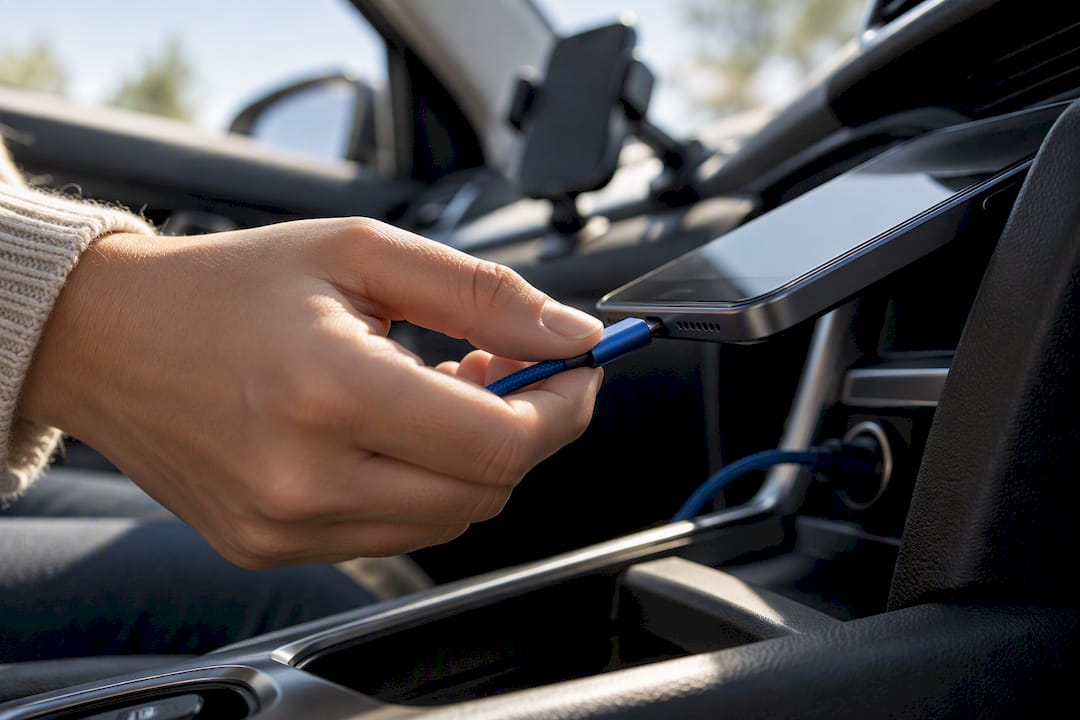
Hybrid processing helps here too. Apps that lean on cloud processing for the heavier translation work, rather than running everything locally, tend to be gentler on your battery, since the phone isn't doing all the computational lifting itself. That said, cloud reliance means you need a stable connection, so there's a real trade-off between battery savings and offline reliability.
If you're doing back-to-back rides, a ride-hailing shift for instance, treat your translator the same way you treat your navigation app: plan for it to drain your battery faster than normal use, and charge accordingly. A phone that dies mid-conversation is worse than one that never opened the app at all.
Connecting Your Translator to Car Audio and Infotainment
Most modern cars support Bluetooth audio streaming, and that's the simplest way to get a voice translator working through your speakers instead of your phone's tiny built-in speaker. Pair your phone once, confirm the app defaults to that audio output, and you're set for most trips.
Some infotainment systems go further, offering app mirroring through Android Auto or Apple CarPlay. Support for third-party translation apps varies by platform and by vehicle, so check whether your translator appears as an option in your car's display before assuming it will show up there automatically. Even without screen mirroring, audio-only Bluetooth pairing covers the core need: hearing translated speech clearly without touching your phone.
Microphone input is the piece people overlook. Some cars have their own built-in microphone array for calls, and depending on your settings, your translator might pull audio from that instead of your phone's mic. That can actually help, since car-integrated mics are often positioned to reduce road noise, but it's worth checking in your app's audio settings which input source is active. A quick phrase test after connecting, the same one you'd run during initial setup, confirms whether the routing is working the way you expect.
Author Perspective: What Actually Changes Next
The biggest daily-use trick isn't a setting, it's a habit: short phrases, one idea at a time, beat long sentences every time. Current tools still lose accuracy fast with crosstalk or highway noise, which is exactly what acoustic complexity researchers keep flagging as the core barrier. What's coming next is agentic AI that remembers context across a trip and ties into vehicle systems directly, not translation as a bolted-on feature. That shift is closer than most drivers assume, but it's still an evolution, not a switch that flips overnight.
— Poul
Try Oralingo Hands-Free on Your Next Drive
Oralingo is built for exactly the situation this article covers: real conversations, hands-free, while you're focused on driving. Some apps let you talk instead of requiring typing or tapping through menus, handling near-instant translation and offering end-to-end encryption as standard features.

Start by downloading the app from the Oralingo landing page, then run the same short test you'd run for any translator: check latency on your own connection, confirm Bluetooth audio routes to your car speakers, and try two or three common phrases before you need it for a real conversation. If you'll be discussing anything private, take a minute to check the app's privacy settings first, encryption only helps if it's configured the way you expect. Try the free tier on your next short drive and see how it holds up before your next long trip.
Sources
For readers who want the deeper technical background behind this article, the Sensory writeup on automotive voice AI covers acoustic complexity in detail, and the Mihup guide to in-car voice assistants breaks down beamforming and hybrid architecture. For a look at where the industry is headed, see Camb. Check any app's own privacy policy before using it for sensitive conversations.
- AI voice technology in cars — Sensory
- In-Car Voice Assistant: The Complete 2026 Guide — Mihup
- Live Translate — Maestra
FAQ
Is There a Live Voice Translator for Driving?
Yes. Apps with hands-free voice mode, like Oralingo, offer real-time two-way conversation translation designed for spoken exchanges rather than typed text. The key is confirming the app supports hands-free activation and automotive-grade noise handling, not just basic phrase translation.
Do Voice Translators Really Work While Driving?
They work, but with real limits. Accuracy holds up well in quiet, single-speaker conditions and drops in heavy traffic, at highway speeds, or with multiple people talking, which is why automotive-grade noise suppression makes such a difference in real cars.
How Much Does a Voice Translator Cost?
Pricing varies widely across apps, from free basic tiers to paid subscriptions for expanded features. Oralingo offers a free version with premium features available through the app; current pricing details are listed on the Oralingo site.
Which Voice Translator Is Most Accurate for Driving?
Accuracy depends heavily on your specific language pair and how noisy your environment is, so no app is universally "most accurate." The safest approach is running a short phrase test in your own car, checking latency and clarity, before trusting any app, Oralingo included, for a real conversation.