Switching languages mid conversation means your app translates each message or spoken sentence before it reaches the other person, so you talk in your language and they hear or read theirs, using one of the four apps to enable easier language learning that support vocabulary development and smooth communication. Modern real-time chat and voice translation apps handle this reliably for everyday one-to-one conversations, as long as you pick a tool with broad language support, fast processing, and offline packs ready to go.
Here's the fast version before we get into the details:
- Choose an app that supports the languages you actually need, not just the popular ones.
- Turn on auto-detection so the app recognizes each language without you tapping a menu every time.
- Download offline language packs before you travel or lose signal, since offline packs cover the basics without a connection while online modes handle the nuance.
- Keep a backup app ready for languages your main tool doesn't support.
Pro Tip: Test your setup in airplane mode before you need it for real. A translation app that works perfectly on Wi-Fi can go silent the moment you lose signal, and you don't want to find that out mid-conversation.
Table of Contents
- How Does Live Translation Actually Work?
- How Do You Set Up an App to Switch Languages Smoothly?
- What's the Best Setup for Travel, Business, and Family Use?
- When Should You Not Rely on Live Translation?
- Why Oralingo Fits This Workflow
- What Workflow Actually Makes Switching Languages Feel Natural?
- How Do You Cut Friction When Languages Change Quickly?
- How Do You Handle Idioms and Cultural Context?
- How Do You Manage Voice Recognition Errors Mid-Switch?
- What Actually Matters Most for This Skill?
- What's the Honest Take on Switching Languages Mid-Conversation?
- Ready to Talk Without the Language Barrier?
- Sources
How Does Live Translation Actually Work?
Every real-time translation app runs the same basic pipeline: speech-to-text (also called automatic speech recognition, or ASR), machine translation, and then delivery, either as translated text or synthesized speech. Live translation combines speech recognition, machine translation, and speech synthesis to enable near-real-time conversation, and it works best when the tool's language coverage and privacy setup actually match what you need.
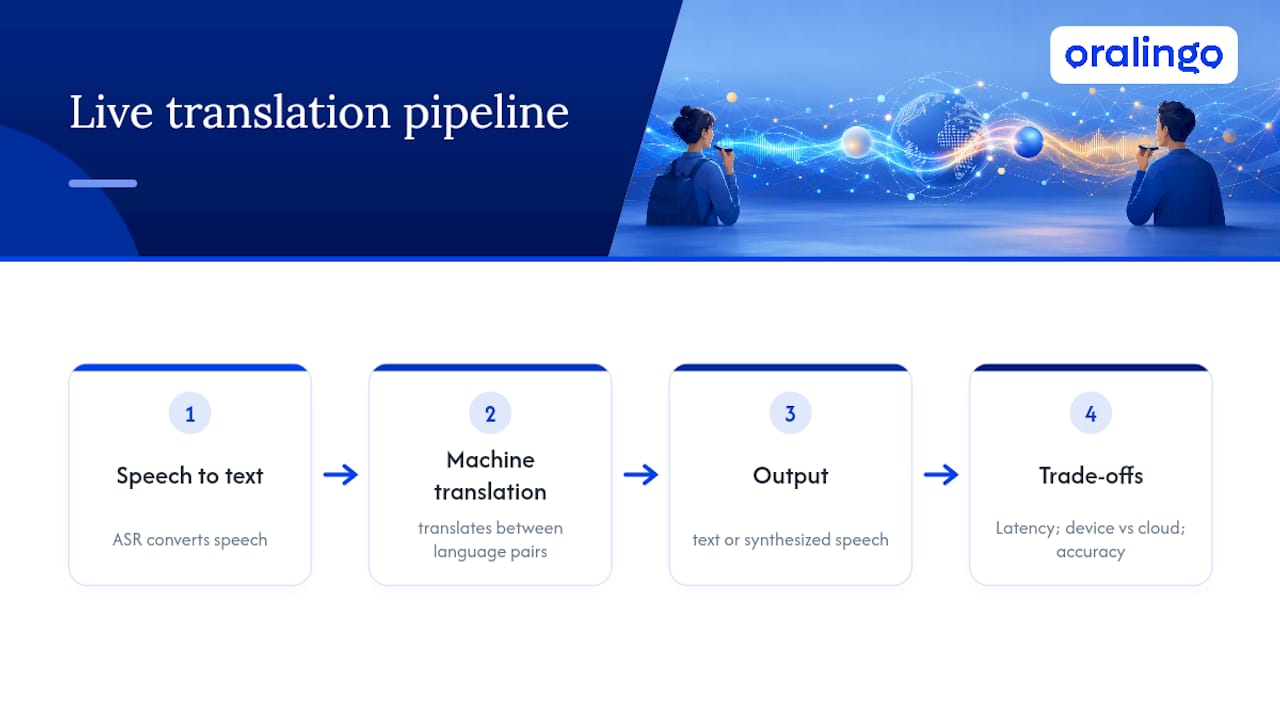
Speed is what makes or breaks the experience. When the gap between speaking and hearing the translation stretches past a second or so, conversation starts to feel stilted, and people talk over each other. Latency is the real usability bottleneck for live speech translation, and even a strong model becomes frustrating to use if it can't keep pace with natural speech. A 2 to 3 second lag, which shows up in some voice assistants built for other purposes, breaks the rhythm of a live back-and-forth.
Where the translation happens matters too. On-device processing keeps your words on your phone longer, which helps with privacy and can cut lag, but it often supports fewer language pairs. Cloud-based processing usually covers more languages and handles complex sentences better, since it can tap larger models, but it needs a steady connection. Tool comparisons show real trade-offs here: some tools lead on language coverage and offline access, others handle nuanced phrasing better but lag behind on live speech.
Accuracy also shifts depending on the language pair and the subject. A tool that nails casual travel phrases might stumble on legal or industry-specific terms, simply because it has seen far more everyday conversation data than niche vocabulary. The underlying pipeline explains why: translation quality depends heavily on how much relevant data trained that language pair, not just how good the app is overall.
How Do You Set Up an App to Switch Languages Smoothly?
A little prep work before your first real conversation saves you from awkward pauses later. Here's a setup sequence that works for most travel, family, or business situations:
- Install the app and download offline packs for your primary languages, then switch your phone to airplane mode, and send a few test messages to confirm they work without a connection.
- Set your primary and secondary languages in the app's settings, and turn on auto-detection if the app offers it, so it recognizes incoming speech or text without you switching manually every time.
- Find the speaker/listener swap control. Most apps have a single button or tap gesture that flips who is speaking and who is listening, and knowing exactly where it is saves you from fumbling mid-sentence.
- Turn on hands-free voice mode for calls or in-person talks where typing would slow things down. Speaking naturally, without reaching for the screen, keeps the conversation feeling like a conversation.
- Position your microphone thoughtfully. Hold the phone closer to the speaker's mouth in noisy environments, since background noise is one of the biggest causes of misheard words that then get mistranslated.
If lag creeps in mid-call, don't fight it. Shorten your sentences, drop into text mode for a few exchanges, or switch to a backup app if one language pair is clearly struggling. UI habits like large buttons and minimal taps matter more than they sound, especially when you're trying to keep eye contact with the person across the table.
Pro Tip: Before an important call, run a two-minute rehearsal with the app and jot down three or four critical phrases you can't afford to get wrong. It takes almost no time and it catches translation quirks before they cost you something.
What's the Best Setup for Travel, Business, and Family Use?
The right settings change depending on who you're talking to and what's at stake.
Travel. Prioritize apps with wide language coverage and solid offline packs, since you'll hit spotty Wi-Fi in airports, rural areas, and subway stations. A camera-based text overlay feature, for reading menus or signs, rounds out the toolkit. Always keep a backup app installed for the rare language your main app doesn't cover.
Business meetings. Multi-device meeting modes and live captions or transcripts turn a translation app into something closer to a meeting assistant. For anything involving contracts, pricing, or commitments, assign one bilingual person to verify the translated summary afterward. Enabling meeting-mode captions and assigning a human verifier catches the kind of small misinterpretation that can derail a deal.
Family conversations. Multilingual families often work best with an asymmetrical setup, where the tech-comfortable family member manages the settings and the other side simply talks or reads. Research on distributed immigrant families found that families value translation tech for keeping relationships alive across distance, but they care just as much about preserving tone and warmth as they do about literal accuracy. A family-focused guide to real-time translation walks through how to strike that balance.
Customer support and internal help desks. When translation connects to a knowledge base, it can answer customer questions directly in their language instead of just translating a canned response. Travel businesses that integrated real-time multilingual chat into booking systems saw faster responses and higher customer satisfaction as a direct result.
When Should You Not Rely on Live Translation?
Live translation is assistive technology, not a substitute for a qualified human interpreter, and treating it otherwise is where things go wrong. Industry explainers are consistent on this point: the tools work well for everyday exchanges but shouldn't carry the full weight of legal, medical, or contractual conversations without a human double-check.
A few situations call for extra caution:
- Legal, medical, or contractual language, where a mistranslated word could have real consequences.
- Language pairs the app handles poorly, which you should test with a few key phrases before you need them for real.
- High-stakes negotiations, where a human backup or bilingual colleague should verify anything critical.
- Public or shared networks, where you should confirm the app encrypts your conversation before discussing anything sensitive.
Translation tools work best paired with simple habits: a quick rehearsal before an important call, a short verification step for anything that matters, and a human fallback when the stakes are high enough that a misunderstanding would actually cost you something.
Keeping a written note of the original phrasing alongside the translation gives you something to check against if a conversation later gets disputed or misremembered.
Why Oralingo Fits This Workflow
Oralingo builds the workflow described above directly into the app instead of leaving it to you to assemble. It offers real-time chat translation across over 100 languages with a 99% accuracy rate, translating messages before they're displayed so the conversation reads naturally instead of arriving as a clunky, literal draft.
- Hands-free voice mode lets you talk instead of type, which matters most in live calls, meetings, or fast in-person exchanges.
- End-to-end encryption covers every conversation, so sensitive business or personal talks stay private.
- Tone and context preservation helps keep messages from sounding stiff or robotic when they cross into a new language.
To get started, install Oralingo, set your primary and secondary languages, and run a short test call in voice mode before you need it for something important. Download any offline packs the app offers for your main destinations, and check the help resources on real-time chat translation if you want a deeper walk-through of the setup.
Oralingo was built around one idea: you shouldn't have to think about the language barrier at all. You should just be able to talk.
What Workflow Actually Makes Switching Languages Feel Natural?
A workflow template beats improvising every time, because it removes the split-second decisions that cause hesitation. For a travel conversation, the sequence looks like this: open the app, confirm both languages are set, tap the swap control before the other person speaks, and let auto-detection handle the rest. For a business call, add one step at the front: enable captions or transcripts before the call starts, so nothing gets lost if the connection wobbles partway through.
Family chats work best with a slightly different template. The tech-comfortable relative sets languages once at the start of the relationship, not at the start of every call, so the less technical participant never has to touch a settings menu. That one-time setup removes the biggest source of friction in ongoing family conversations.
For remote team meetings, the template shifts again: designate one person to watch the transcript for accuracy while others focus on the conversation itself, and pause briefly after any decision point so the transcript can catch up and get confirmed by both sides.
The common thread across all four templates is sequencing the setup steps before the conversation starts, not during it. Every time you have to stop mid-sentence to adjust a setting, you break the flow you're trying to protect. Build the habit once, per relationship or per meeting type, and the app fades into the background where it belongs.
How Do You Cut Friction When Languages Change Quickly?
Rapid language switching, like a family dinner with three languages in play or a business call that shifts between two, creates more errors than a steady one-on-one exchange. The fix isn't a smarter app. It's slowing your own pace slightly and giving the translation pipeline a clean signal to work with.

Speak in complete, moderate-length sentences instead of trailing off or stacking clauses. ASR systems, the speech-to-text layer of the pipeline, struggle most with run-on speech and mid-sentence interruptions, so a clean stop gives the app a clear boundary to translate against.
Pause half a second between speakers. It feels unnatural at first, but that gap is what lets the app finish processing one language before the next one starts, which matters more the more languages are in rotation.
Avoid speaking two languages in the same sentence if you can help it. Code-mixed speech confuses the detection layer, since the app has to guess where one language ends and the next begins, and that guess is often wrong.
When three or more people are switching rapidly, assign an unofficial "floor," meaning one person speaks at a time and waits for the translation to land before the next person jumps in. It feels formal for the first few minutes and then becomes second nature.
How Do You Handle Idioms and Cultural Context?
Idioms are where even accurate translation apps can produce something technically correct but practically confusing. "Break a leg" translated word for word into most languages means nothing, or worse, sounds alarming. The fix isn't expecting the app to catch every idiom. It's building a habit of rephrasing.
Swap idioms for plain, literal language before you say them, especially in business or high-stakes contexts. Instead of "let's touch base next week," say "let's talk again next week." The translated version lands correctly the first time, and you skip the confused follow-up question.
Cultural context around directness also shifts by language and region. A phrase that reads as polite hedging in English can translate into something that sounds evasive or, in the opposite direction, blunt to the point of rudeness in another language. When the stakes are high, a quick clarifying follow-up question closes that gap faster than trying to predict how a phrase will land.
For ongoing relationships, whether a business partner or a family member, keep a running note of phrases that consistently translate awkwardly and default to a plainer alternative. It takes a few conversations to build that list, and it saves real friction later.
How Do You Manage Voice Recognition Errors Mid-Switch?
Most translation errors in live voice conversations don't come from bad machine translation. They come from the speech recognition layer mishearing a word before translation even starts, and that problem gets worse the moment you switch languages.
Background noise is the single biggest cause. Move to a quieter spot or hold the phone closer to your mouth when a call matters, especially in a switch-heavy conversation where the app is already working harder to detect which language just started.
Accents and regional pronunciation can also trip up ASR, particularly right after a language switch, when the model hasn't fully settled into the new language's expected sound patterns. If a translation comes back clearly wrong, repeat the sentence slightly slower rather than louder. Speed, not volume, is usually what the recognition engine struggles with.
Watch for the app's confidence indicator if it has one. Some tools flag low-confidence transcriptions before translating them, and glancing at that flag for a half second can save you from sending a garbled message.
If errors cluster around one specific language pair, that's a signal to check whether that pair is fully supported offline or only partially supported online, since coverage gaps often show up as recognition trouble before they show up as translation trouble.
What Actually Matters Most for This Skill?
Real-time translation apps let a business professional close a deal, a traveler order dinner, and a family stay close across borders, all without waiting for a scheduled interpreter.
| Point | Details |
|---|---|
| Test offline packs first | Download language packs before travel and confirm they work in airplane mode. |
| Sub-second latency matters most | Delays of 2 to 3 seconds break conversational flow, so prioritize speed over extra features. |
| Rephrase idioms, don't rely on translation | Swap idioms for plain language before speaking to avoid confusing or inaccurate translations. |
| Use a human backup for high stakes | Legal, medical, or contractual conversations need a bilingual verifier, not just an app. |
| Oralingo covers the full workflow | It supports 100+ languages at 99% accuracy, with hands-free voice mode and end-to-end encryption. |
What's the Honest Take on Switching Languages Mid-Conversation?
The conventional advice on this topic obsesses over accuracy percentages, and that's the wrong first question. Accuracy matters, but latency is what actually determines whether a conversation feels human or feels like waiting for a fax machine. A tool that's slightly less precise but responds in under a second will beat a more "accurate" tool that makes you wait three seconds every single exchange, because conversation is a rhythm, not a transcript.
The other place conventional advice falls short is treating every use case the same. A business call, a family dinner, and a solo trip abroad need different settings, different fallback plans, and different tolerance for error. What the reader should prioritize first isn't finding the "best" app in the abstract. It's matching an app's language coverage, latency, and privacy setup to their specific situation, then building the two or three habits, rehearsing key phrases, testing offline mode, that make the technology disappear into the background of an actual conversation.
— Poul
Ready to Talk Without the Language Barrier?
Oralingo gives you what the workflow in this guide is built around: pre-delivery translation that shows each person the conversation in their own language, without the lag or guesswork that comes from stitching together separate apps for text and voice.

If you're heading into a business trip, planning a family call across time zones, or just tired of switching between three different translation tools mid-conversation, download Oralingo, set your languages, and run a two-minute test call in voice mode before you need it for real. Get started with Oralingo and see how it handles your next cross-language conversation.
Sources
- What is live translation? How it works & everyday uses | T-Mobile
- Remote Communication in Distributed Immigrant Families (research paper)
- Offline language packs guidance | Microsoft Translator blog
- Instadesk realtime multilingual chatbot case study