
For one-to-one voice and text translation, Oralingo is the recommended solution. It translates messages before they appear on screen, supports hands-free voice mode, covers 100+ languages, and keeps every conversation end-to-end encrypted. You can focus on the conversation, not the language barrier.
- Download Oralingo from the App Store or Google Play
- Open the app, create a free account, and grant microphone permissions
- Select your languages, switch on voice mode, and start talking
- Expect translated text or audio in near real time, with no typing required
Table of Contents
- What does a "real-time translator in ear" actually mean?
- How does real-time in-ear translation actually work?
- How to set up in-ear translation for a one-on-one conversation
- How to choose the right in-ear translation solution
- Accuracy, limits, and when to use a human interpreter
- Privacy and security: what to check before you start
- Oralingo in practice: features and quick setup examples
- Key Takeaways
- Why in-ear translation is closer than most people think
- Oralingo: download the app and start talking
- Sources and further reading
What does a "real-time translator in ear" actually mean?
The phrase covers two things working together: a Bluetooth earbud (the audio interface) and a companion app (the translation engine). The earbud captures your voice and plays back the translated audio. The app, running on your phone, handles the heavy lifting: speech recognition, translation, and text-to-speech output.
Phone-only setups work too. You can hold a phone between two people and see translated text on screen. But the in-ear experience is different. Both people can wear an earbud, hear translations in their own language, and hold a natural back-and-forth conversation without staring at a screen.
Common uses include:
- Travel conversations with hotel staff, vendors, or locals
- Remote business meetings with international colleagues
- Family chats across language gaps, whether in person or over a call
- Cross-language relationships where one partner speaks a different native language
In-ear translation devices have moved well past novelty. Today's apps support "one-on-one" or "Free Talk" modes where both parties hear translations naturally, without interrupting the flow of conversation.
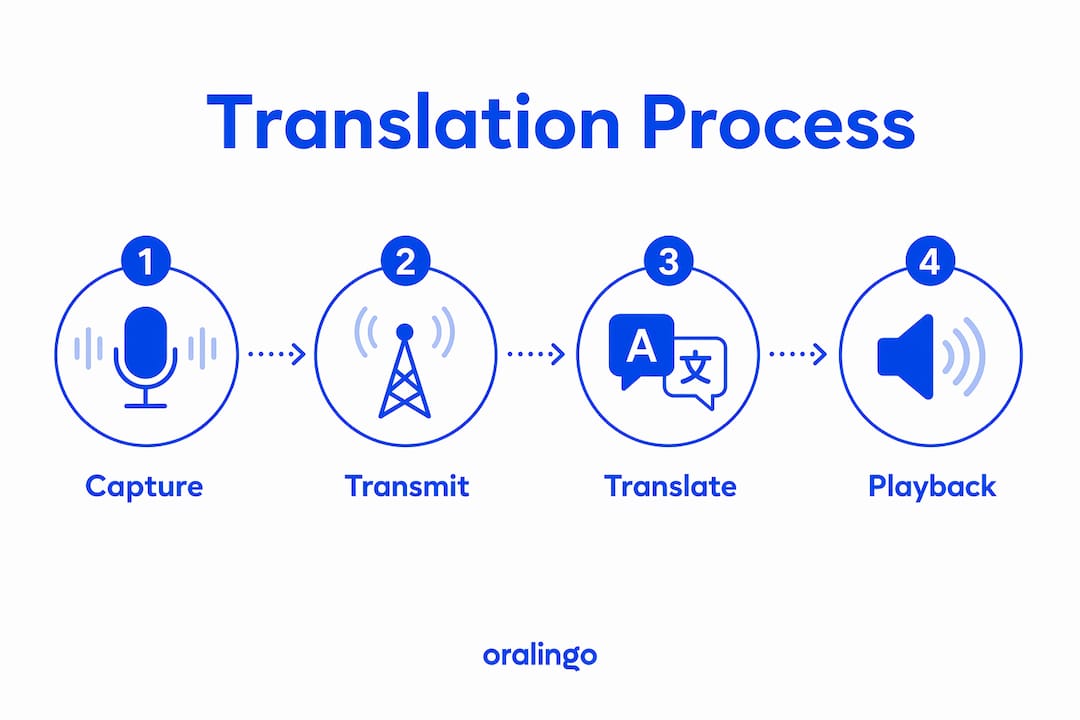
How does real-time in-ear translation actually work?
The signal path has four stages, and each one affects how natural the conversation feels.

| Stage | What happens | Key factor |
|---|---|---|
| 1. Capture | Earbud microphone picks up speech | Mic quality, noise level |
| 2. ASR | App converts audio to text (speech recognition) | Accent, clarity, background noise |
| 3. MT | Cloud engine translates the text | Language pair, model quality |
| 4. Output | Translated text displays or TTS plays in ear | Latency, voice naturalness |
Latency is the most important variable. Sub-second response times are common in good conditions, and some devices advertise 0.2-second responses. Latency under roughly 300 ms generally feels conversationally natural. Above that, pauses start to feel awkward.
The earbud itself is not the translator. It is the audio input and output device. Your smartphone and a cloud server do the actual recognition and translation. That means a stable internet connection matters as much as the earbud hardware. Some products let you hear the original speech in one ear and the translation in the other, which helps you catch nuance and reduces misunderstanding.
Noise suppression also plays a big role. A close-microphone setup in a quiet room will always outperform a crowded café. For the best ASR accuracy, keep utterances short and clear.
How to set up in-ear translation for a one-on-one conversation
- Install the app. Download Oralingo from the App Store (iOS) or Google Play (Android).
- Create an account and grant permissions. Allow microphone access when prompted. On iOS, this is under Settings > Privacy > Microphone. On Android, the app requests it on first launch.
- Pair your Bluetooth earbuds. Connect them through your phone's Bluetooth settings before opening the translation session. Android's Live Translate also supports headphone-based conversation modes if you want a fallback.
- Select your languages and voice. Choose your source language and the target language. Pick a voice style if the app offers it.
- Enable hands-free or one-on-one mode. This lets both parties speak naturally without tapping a button each time.
- Test with a short phrase. Say something simple, confirm the translation sounds right, then start the real conversation.
Pro Tip: Switch languages quickly by tapping the language selector mid-conversation. If you notice cross-talk (both people speaking at once), pause briefly between turns. Short, clear sentences translate faster and more accurately than long, complex ones.
How to choose the right in-ear translation solution
Not every app or device is equal. Use this checklist before you commit.
Questions to ask:
- Does it cover the specific language pair you need, including dialects?
- Is there a hands-free or voice mode, or do you have to tap a button each turn?
- What is the claimed accuracy, and under what conditions?
- Does it work offline, or does it need a data connection?
- What devices and OS versions does it support?
- How long does the earbud battery last during active translation?
- Is there a free tier, and what are its limits?
- How often does the app receive updates?
Red flags to watch for:
- No privacy policy or vague data retention language
- Accuracy claims with no stated conditions (noise level, language pair)
- No mention of latency or only marketing-level descriptions
- No customer support channel beyond an FAQ page
Pricing shapes to expect: Most solutions offer a free tier with usage caps, then a paid subscription for unlimited voice translation, premium voices, and priority support. Subscriptions typically run monthly or annually.
| Use case | Top priority | Watch out for |
|---|---|---|
| Travel | Language breadth, offline mode | Data roaming costs |
| Business meetings | Accuracy, latency, voice mode | No enterprise privacy controls |
| Cross-language relationships | Natural voice, tone preservation | Flat, robotic TTS output |
| Student abroad | Free tier limits, ease of use | Accuracy in academic vocabulary |
For real-time multilingual negotiations, language coverage and latency matter more than voice naturalness. For personal conversations, tone and warmth in the translated voice matter a lot.
Accuracy, limits, and when to use a human interpreter
Real-time translation tools have gotten good. Browser-based tools report up to 95% accuracy in favorable conditions. In practice, accuracy drops with heavy accents, background noise, fast speech, and technical jargon. No app is immune to this.
Scenarios where you should use a certified human interpreter instead:
- Legal proceedings, depositions, or court hearings
- Medical consent conversations or clinical diagnoses
- Contract negotiations with binding terms
- Any situation where a mistranslation has serious consequences
AI translation tools are best treated as assistants, not replacements for certified interpretation in critical contexts. Even high-stakes speaking assessments recommend human review alongside AI feedback.
Pro Tip: Use the confirm-by-paraphrase technique. After a key point, ask the other person to repeat it back in their own words. This catches translation errors before they cause confusion.
Privacy and security: what to check before you start
Your conversations may contain sensitive information. Before using any in-ear translation app, verify these points:
- End-to-end encryption: Is the audio and text encrypted in transit and at rest?
- Data retention: Does the app store your audio or transcripts for model training?
- Local vs. cloud processing: Does translation happen on-device or on a remote server?
- Privacy policy: Is it clear, specific, and up to date?
- Independent audits: Has the security been reviewed by a third party?
Some browser-based tools process audio transiently and use encrypted connections for session protection, but do not always guarantee permanent deletion. Always read the privacy policy before a sensitive conversation.
Oralingo uses end-to-end encryption on every conversation. Your messages and voice sessions are not stored or shared. That matters most for business users and anyone discussing personal or confidential topics.
Oralingo in practice: features and quick setup examples
Oralingo is built specifically for one-to-one chat and voice translation. Here is what you get:
- Pre-delivery translation: Messages are translated before they appear on screen, so the conversation flows without visible lag
- Hands-free voice mode: Speak naturally; the app handles turn detection and translation without button taps
- Custom voice and tone settings: Adjust the translated voice style to match the register of your conversation
- 100+ languages supported: From Spanish and Mandarin to Arabic and Portuguese
- End-to-end encryption: Every session is private by default
Three quick use cases:
- Business meeting: A US-based manager chats with a supplier in Japan. Oralingo translates both sides of the text conversation in real time, preserving professional tone.
- Travel: You ask a local in Mexico City for directions. Switch to voice mode, speak in English, and hear the Spanish translation play through your earbuds.
- Cross-language relationship: You and your partner speak different native languages. Real-time translation keeps the conversation warm and natural, not clinical.
Key Takeaways
Oralingo is the most practical choice for one-to-one real-time translation because it combines hands-free voice mode, 100+ language support, and end-to-end encryption in a single mobile app.
| Point | Details |
|---|---|
| How it works | Earbuds handle audio; your phone and cloud do speech recognition and translation. |
| Latency matters | Sub-second response times feel natural; above 300 ms, conversation starts to feel stilted. |
| Accuracy has limits | Noise, accents, and jargon reduce accuracy; use a human interpreter for legal or medical contexts. |
| Privacy first | Check for end-to-end encryption and a clear data retention policy before any sensitive conversation. |
| Start with Oralingo | Download the app, enable voice mode, and test with a short phrase before your first real session. |
Why in-ear translation is closer than most people think
Most people assume real-time translation in your ear is still a futuristic concept. It is not. The gap between what the technology promises and what it actually delivers has narrowed considerably. The bigger issue is that most users never configure the tool correctly, so they blame the technology when the problem is setup.
Short turns, a quiet environment, and the right language pair will get you to a genuinely natural conversation faster than any hardware upgrade. The apps that matter most are the ones that handle privacy seriously and translate before you see the text, not after. That pre-delivery approach is what separates a real conversation tool from a glorified dictionary.
Oralingo: download the app and start talking
Language barriers cost you time, missed connections, and real opportunities. Oralingo removes them without requiring you to learn a new language or hire an interpreter.

The free tier lets you start translating immediately. Upgrade to premium for unlimited voice translation, additional voice styles, and priority support. Setup takes under two minutes: download Oralingo from the App Store or Google Play, grant microphone access, pick your languages, and start your first conversation.
Sources and further reading
Research sources used in this article:
- iFLYTEK AI Translation Earbuds: simultaneous translation and one-on-one modes
- Google Translate: hearing live translations through headphones on Android
- Notta Real Time Translate: accuracy ranges and privacy notes
- AI feedback for speaking: accuracy limits in high-stakes contexts
Oralingo blog posts for deeper reading:
- How real-time chat translation works
- How instant message translation works
- Voice translation in meetings
- Real-time multilingual negotiation guide