
Multilingual voice chat is a real-time chat-translation app that turns your spoken or typed words into another language before the other person ever sees or hears the original. The fix is simple: pick a purpose-built app with sub-second latency, wide language coverage, and end-to-end encryption. Some apps support a wide range of languages with high accuracy, translating messages before delivery so conversations feel natural instead of stitched together.
TL;DR:
- Multilingual voice chat apps should have sub-second latency, broad language support, and end-to-end encryption for real-time, natural conversations.
- These apps excel in casual, quick interactions like family calls, travel, or brief business talks but are unsuitable for high-stakes formal proceedings.
- End-to-end speech-to-speech translation models provide faster, more tone-preserving results but are complex to adapt for specialized vocabularies.
- Testing should include latency measurement, noise handling, vocabulary customization, and privacy verification before committing to a specific app.
- Integration with existing calls can be achieved through browser-based sidecars, and dedicated apps work independently regardless of platform, simplifying cross-platform use.
Table of Contents
- What Counts as Multilingual Voice Chat (and What Doesn't)
- When Should You Use Multilingual Voice Chat?
- How Does Real-Time Voice Translation Actually Work?
- How Do You Choose and Test a Voice Chat Translator?
- Why Oralingo Fits This Job
- How Should the Interface Handle Two Languages at Once?
- How Do You Handle Accents, Dialects, and Unclear Speech?
- Can You Use Voice Chat Translation Inside Other Apps You Already Use?
- What Other Multilingual Voice Chat Tools Exist?
- Where This Technology Is Headed
- Ready to Talk Without the Language Barrier?
- Sources
What Counts as Multilingual Voice Chat (and What Doesn't)
Multilingual voice chat, in the sense that matters here, is a mobile app built for one human talking to another human across a language gap. You speak or type, the app translates before it ever reaches the other screen, and the other person replies in their own language just as naturally. This is not the same category as an AI voice bot answering customer support tickets or a developer's speech API buried inside someone else's software. Those are automation tools built for machines to talk to people. This article is about people talking to people.
The scope here is narrow and practical:
- One-to-one and small-group human conversations, not automated call centers or IVR systems.
- Mobile-first apps, since that is where these conversations actually happen, on the road, at the dinner table, in a meeting hallway.
- Optional browser or meeting sidecars for teams that need the same translation layer inside video calls.
That mobile-first framing matters because most competing tools were built for the browser first and the phone second. A family video call in a kitchen, a traveler asking for directions, and a business call from an airport lounge all demand something that works instantly on a phone, without a laptop, a headset rig, or a stable desk connection. If your use case is developer infrastructure or automated voice agents, you are shopping in the wrong aisle entirely.
When Should You Use Multilingual Voice Chat?
Not every cross-language moment calls for an app. Some do, and some genuinely call for a human interpreter instead. Here is how to sort your situation:
- Family calls across countries. A grandmother in Seoul and a grandson in Chicago talking about the weekend need warmth and speed, not perfect grammar. Voice chat translation handles this well because small phrasing slips do not carry real consequences.
- Traveler interactions. Ordering food, asking for a pharmacy, negotiating a taxi fare. Fast, approximate translation beats a phrasebook every time, and it beats silence.
- Quick business check-ins. A sales rep confirming shipping details with a supplier in Vietnam does not need a certified interpreter for a five-minute call.
- Remote team one-on-ones. A manager in Madrid checking in with a developer in Manila benefits from natural back-and-forth voice, not stilted typed messages.
Where this approach breaks down: legal depositions, medical diagnoses, immigration hearings, and any formal proceeding where a mistranslation carries real risk. In those settings, hybrid AI and human interpretation remains the standard. Many event and interpretation platforms already route routine sessions to AI and reserve trained humans for keynotes or regulated moments, and that split holds true for everyday high-stakes conversations too.
How Does Real-Time Voice Translation Actually Work?
Two architectures compete for your conversation, and knowing the difference helps you understand why some apps feel snappy and others feel like talking through a delay pedal.
The first is the cascaded pipeline: automatic speech recognition (ASR) turns your voice into text, machine translation (MT) converts that text into the target language, and text-to-speech (TTS) turns it back into audio. Most production systems still run this way because each stage can be inspected, swapped, and debugged independently. The trade-off is speed. Three sequential steps add up, and most production systems in 2026 still ship cascaded ASR to MT to TTS pipelines specifically because observability and vendor flexibility outweigh the latency cost for most use cases.
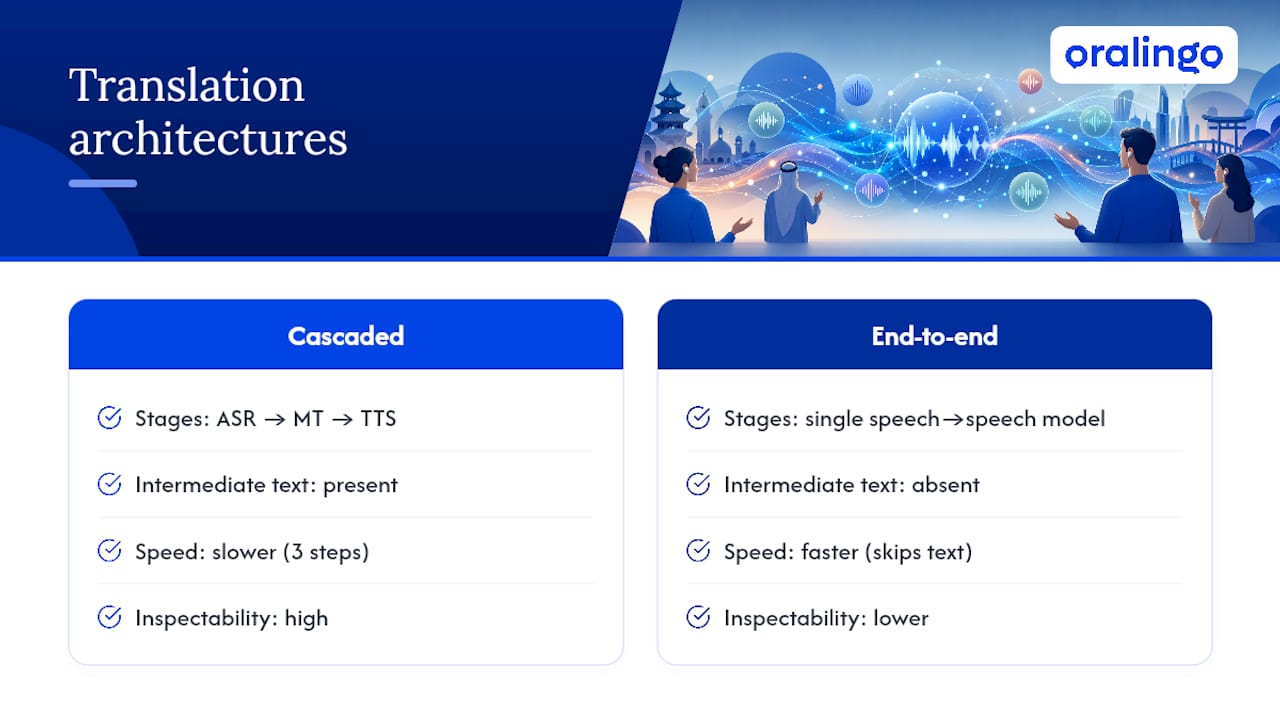
The second is end-to-end speech-to-speech translation, which, where a single model maps input audio directly to output audio. It preserves tone and prosody better, and it tends to run faster since it skips the intermediate text stage. The catch is that it is harder to audit, and adapting it to a specific industry's vocabulary takes more work.
Why milliseconds decide whether a conversation feels human: captions-only translation typically runs about 300 to 500 milliseconds end-to-end, voice-to-voice translation lands closer to 700 to 900 milliseconds, and anything past 1.2 seconds starts to break the rhythm of conversation, forcing people into an awkward walkie-talkie cadence.
Behind the scenes, a real deployment needs more than a translation model. A working production architecture includes a media entry point for the call itself, an orchestration layer, a swappable translation provider, and persistent storage for transcripts and audit logs. It also has to handle two people talking over each other, decide whether to translate in full duplex or wait for a pause, and log enough detail for compliance without storing more than it should.
How Do You Choose and Test a Voice Chat Translator?
Testing a candidate app takes fifteen minutes if you know what to check. Run through this before you commit to a subscription.
- Measure latency yourself. Say a full sentence and time the gap until translated audio starts. Anything creeping past a second will feel sluggish in real conversation.
- Confirm your specific language pair. Broad claims like "100+ languages" mean little if your particular pair, say Tagalog to Portuguese, runs through an inferior fallback model.
- Test with background noise. Run it in a café or with a TV on. Real conversations rarely happen in silence.
- Try your own vocabulary. Feed it names, industry terms, or family nicknames. Domain tuning with as little as 10 to 30 hours of relevant audio plus glossary injection is the cheapest way to lift accuracy for specialized speech, so ask whether the app supports custom terms.
- Check the privacy policy. Look specifically for end-to-end encryption and a clear data retention window, not vague "we protect your data" language.
- Review the pricing model. Free tiers are fine for occasional use, but frequent users should know exactly what a paid tier unlocks before they need it mid-trip.
Red flags include apps that will not state a retention policy, apps that lag more than a second on a simple test sentence, and apps with no offline or low-bandwidth fallback.
Pro Tip: Use a wired or Bluetooth microphone instead of your phone's built-in mic when testing in noisy environments, and try push-to-talk mode for group settings where several people might speak at once. It cuts down on false starts more than any setting inside the app itself.
For a deeper look at onboarding and conversational habits that make cross-language chat smoother, Oralingo's guide to seamless multilingual conversation walks through practical setup steps.
Why Oralingo Fits This Job
Some real-time chat translation apps are built around the idea of translating before delivery so the conversation flows naturally.
- Pre-delivery translation means each message arrives already in the recipient's language, spoken or typed.
- Hands-free voice mode may allow talking naturally without typing, helpful when walking, driving, or tired of tapping a screen.
- Support for many languages helps cover a broad range of family, travel, and business conversations.
- High accuracy rates are achieved through domain and phrase testing.
- End-to-end encryption on conversations helps keep sensitive details private.
If you want the technical detail behind how the translation pipeline handles timing and media transport, Oralingo's breakdown of real-time chat translation architecture covers it. For remote teams evaluating this beyond one-on-one chats, the guide to multilingual team chat is worth a look before you roll it out company-wide.
How Should the Interface Handle Two Languages at Once?
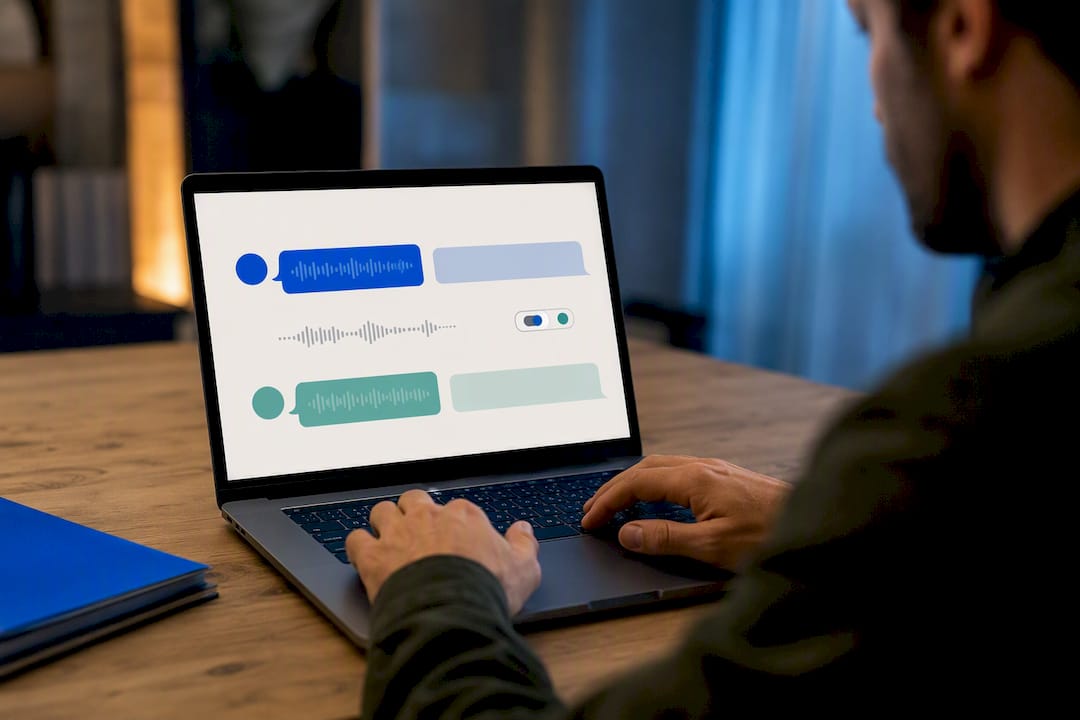
The best multilingual voice chat interfaces make the language barrier invisible instead of turning it into another thing to manage. That means showing the original message and its translation together, not swapping one for the other and forcing you to guess what was actually said.
Clear speaker labeling matters more in voice chat than in text. When two people are talking rapidly across a language gap, you need an instant visual cue for who said what and in which language, especially in a group setting with three or more speakers.
Toggle controls should be immediate; you should be able to switch your own output language mid-conversation without digging through a settings menu. A parent switching between Spanish for a grandmother and English for a spouse on the same call, for instance, needs that switch to take one tap, not three.
Visual latency indicators help too. A subtle "translating..." cue or waveform animation sets expectations during the brief gap between speaking and hearing the translation, which reduces the instinct to repeat yourself or talk over the response. Font size and contrast matter more here than in most apps, since users are often reading translated text quickly while also listening, sometimes in bright sunlight while traveling or in a dim room during a late-night family call. Good design treats those constraints as first-class, not afterthoughts.
How Do You Handle Accents, Dialects, and Unclear Speech?
Accents and regional dialects are where most translation apps quietly fall apart, and it rarely has anything to do with the language itself.
Speak at a natural, steady pace instead of over-enunciating. Counterintuitively, exaggerated pronunciation confuses automatic speech recognition more than normal conversational speech, since the models are trained on natural speech patterns, not theatrical ones.
Give the app a moment of silence between sentences rather than running thoughts together. A half-second pause helps the system correctly segment where one idea ends and the next begins, especially across languages with different sentence structures.
Regional dialects, Quebec French versus Metropolitan French, or Mexican Spanish versus Castilian Spanish, translate more accurately when you can select the specific regional variant instead of a generic language setting. If an app only offers "French" or "Spanish" with no regional options, expect more frequent misfires on local slang and idioms.
Background noise compounds every other problem. Move to a quieter spot when possible, and if that is not an option, a directional microphone or a simple pair of earbuds with a built-in mic filters out significant ambient noise before it ever reaches the translation engine.
Finally, when the app gets something wrong, rephrase rather than repeat. Saying the same misheard sentence louder rarely helps; saying it differently often does.
Can You Use Voice Chat Translation Inside Other Apps You Already Use?
Multilingual voice chat rarely lives in a vacuum. Most people need it to work alongside tools they already rely on for meetings, calls, and team chat.
Browser-based sidecars are one common pattern, where a lightweight WebRTC layer sits alongside your existing video call and translates audio in real time without requiring everyone on the call to switch platforms. OpenAI's realtime translation cookbook documents this exact pattern, along with phone-call integrations through services like Twilio and group video translation through platforms like LiveKit.
Many mainstream meeting platforms, including Google Meet and Microsoft Teams, now ship basic built-in translation as a standard feature. That is fine for a generic internal meeting, but teams with compliance requirements or specialized vocabulary typically still need custom orchestration layered on top rather than relying on the platform default.
For everyday personal and business use, though, a dedicated app that runs independently of any single platform tends to be the simpler answer. It works the same whether you are on a phone call, texting, or standing face-to-face with someone, and it does not depend on which video tool either side happens to have installed. If you are comparing broader productivity and communication tool options before settling on one approach, this partner roundup of AI communication tools is a reasonable starting point for context.
What Other Multilingual Voice Chat Tools Exist?
The market beyond dedicated conversation apps splits into a few broad categories worth knowing before you commit to one path.
Built-in meeting platform translation now ships inside several major video conferencing tools, covering generic business meetings without any extra setup. It is convenient, but it is rarely tuned for casual or personal conversation and often lacks the accuracy needed for specialized vocabulary.
Enterprise interpretation platforms serve large conferences and regulated industries, frequently blending AI translation for routine sessions with human interpreters on standby for high-stakes moments. These are built for institutions, not for a traveler ordering coffee or a family catching up over video.
General-purpose translation apps that were originally built for text and later bolted on voice features tend to show their seams: noticeable lag, clunky switching between typing and talking, and translation quality that was optimized for reading rather than natural back-and-forth speech.
Purpose-built conversational voice chat apps, the category Oralingo belongs to, are designed from the ground up for the specific rhythm of one person talking and another person listening in a different language. The distinction that matters most when comparing any of these categories is whether pre-delivery translation and hands-free voice were core design goals or features added later. That design choice shows up immediately the moment you try to have an actual back-and-forth conversation instead of exchanging single messages.
Where This Technology Is Headed
Latency keeps shrinking, and speaker-preserving models are getting better at keeping someone's tone and cadence intact across languages, not just their words. That shift is why translation is quickly becoming table stakes rather than a premium feature. Meeting platforms increasingly build it in by default, and this raises the bar for any app claiming to do it better. Observability and privacy will matter more, not less, as adoption grows. Before you settle on a tool: test it in your actual environment, time the delay yourself, confirm the encryption and retention policy in writing, and pick a free or paid tier based on how often you actually need it. For deeper architecture details, the guides linked earlier in this piece are worth a second look.
— Poul
Ready to Talk Without the Language Barrier?
If you have read this far, you already know what to look for: fast translation, wide language coverage, and privacy you do not have to take on faith. Some apps translate messages before they reach the other screen so conversations move at a natural pace instead of a stop-and-start crawl.

Getting started takes less time than reading this sentence twice:
- Download the app on iOS or Android.
- Set your language and your contact's language once, and it stays saved.
- Switch on hands-free voice mode for calls where typing just gets in the way.
- Start talking. Messages are encrypted and translated before delivery.
Head to the Oralingo app page to try it with the next conversation you need to have across a language gap.
Sources
- Real-Time Video Translation: The 2026 Engineering Playbook
- Real-time translation production architecture
- Realtime translation cookbook (OpenAI)