
Inline chat translation converts a message into the reader's language before it ever appears on-screen, so a conversation flows the way a normal one does. Your first move should be to check whether your chat platform already has an automatic-translation setting, since Google Chat, Microsoft Teams, and Zoom all offer one built in. When your platform doesn't support it, or end-to-end encryption blocks server access to your messages, a dedicated app like Oralingo that translates before delivery fills the gap without breaking your flow.
TL;DR:
- Built-in platform settings enable fast translation activation but may be limited to new messages and vary in language support.
- End-to-end encryption often prevents server-based translation unless the tool translates on-device or via integrated solutions that prioritize privacy.
- API-based translation involves costs, quotas, and handling of original messages, which is crucial for compliance and accuracy.
- The best seamless translation tools translate before delivery, balancing speed, language coverage, and privacy, with dedicated apps like Oralingo fitting specific needs.
Table of Contents
- How Real-Time Chat Translation Actually Works
- Where Does Inline Translation Actually Show Up?
- How Do You Turn On Translation in Google Chat, Teams, and Zoom?
- What Should Developers Know Before Building It In?
- Does Encryption Break Inline Translation?
- What Actually Matters When You Pick a Translation Tool?
- Talk Naturally in Any Language With Oralingo
- Sources
How Real-Time Chat Translation Actually Works
There are two competing designs behind every chat translation feature, and knowing the difference tells you what to expect from any tool you pick.
Pre-delivery translation converts the message before it lands in your chat window, so you read it in your own language from the start. Post-view toggle translation shows you the original text first, and you tap or click to trigger a translation on demand, usually replacing the original until you switch it back. Zoom Chat works this way: pick "Translate" from the message menu and it swaps in the translated text until you select "Show Original."
Where the translation actually runs matters more than most people realize. Some tools translate on your device, some route through the platform's own servers, and others call a cloud API like Google Cloud Translation. Server and cloud routes add a translation hop, so expect a short delay measured in a second or less on a solid connection, longer on weak mobile data.
A few practical limits show up across nearly every implementation:
- Character or message-length caps, sometimes as tight as 916 characters per message in certain Google Cloud contact-center setups.
- Language coverage gaps. Not every tool supports the same list, and rare language pairs often translate less accurately.
- Translated message history that may only apply going forward. Google Chat's Automatic Translation setting typically covers new incoming messages, not everything already in the thread.
Where Does Inline Translation Actually Show Up?
You'll run into inline translation in four main places, and picking the right one comes down to how much control you need versus how fast you want to be up and running.
- Built-in platform settings. Google Chat, Teams, and Zoom each ship native translation controls. These are the fastest option if your team already lives in one of these tools and everyone has the setting turned on.
- Chat translator bots. Group chats on LINE, Telegram, and Discord often add a bot that watches the conversation and posts translations inline. Good for casual group use, though bots can clutter a thread with duplicate messages.
- Embeddable widgets. Tools like TalkJS let a website or support team enable per-conversation translation automatically when two people have different locales set, giving every visitor the same consistent experience.
- Dedicated translation apps. A standalone app such as Oralingo works independently of the platform, translating before you even see the message, which matters when you're talking to someone outside your usual chat tool entirely.
Before you commit to one, run through a short checklist: do you have admin rights to change platform-wide settings, does your privacy policy allow routing messages through a third party, does the tool cover the languages you actually need, and how immediate does the translation have to feel. If you want a deeper look at how teams evaluate this for daily work, multilingual team chat breaks down the trade-offs further.
How Do You Turn On Translation in Google Chat, Teams, and Zoom?
Each major platform handles this a little differently, so here's the fastest path for each one.
- Google Chat: Open Settings, find Automatic Translation, and turn it on. On mobile, new messages translate automatically once enabled; older messages in a thread usually won't retranslate until you back out and reopen the chat.
- Microsoft Teams: Right-click any message and choose "Translate" for a one-off translation, or open your chat settings to enable automatic translation going forward. Teams supports over 60 languages for this feature. Admins should confirm the setting is allowed under your organization's policy before rolling it out team-wide.
- Zoom Chat: Hover over a message, click the ellipsis menu, and select "Translate." Zoom supports at least 39 languages for chat translation, and the translated text replaces the original until you tap "Show Original."
- Adding a translator bot to a group chat: Add the bot as a contact or invite it into the group, set each person's preferred language in the bot's configuration, then send a test message to confirm it's posting translations correctly before relying on it.
Pro Tip: Test any new translation setting with a short, simple sentence first. Idioms and slang are where automatic translation tends to slip, and you want to catch that before a real conversation depends on it.
What Should Developers Know Before Building It In?
If you're the one implementing translation rather than just flipping a switch, plan around a few technical realities up front.
- API and authentication setup. Google's Cloud Translation API requires enabling the API, creating a service account, and generating keys with the right permissions before anything translates.
- Message-length limits. Some implementations cap messages at 916 characters. For longer text, split by sentence boundaries and reassemble client-side rather than truncating mid-thought.
- Quotas and cost. Translation APIs bill by character volume and enforce rate limits, so budget for both and build in graceful degradation when the API throttles a request.
- Original text preservation. Store the original message alongside the translation instead of overwriting it. That keeps a compliance trail intact and lets a bilingual reader double check the nuance.
- Encryption conflicts. End-to-end encrypted platforms often can't run server-side translation at all, since the server never sees the plaintext to translate.
For a closer look at the setup work involved, real-time chat translation walks through the technical requirements in more depth, and a partner like Arkian can help smaller teams handle the backend localization and API configuration work directly.
Does Encryption Break Inline Translation?
Yes, often. Strong end-to-end encryption means the platform's own servers never see your message in readable form, so there's nothing for a server-side translation feature to read. Microsoft's own documentation confirms that advanced encryption settings can prevent built-in translation features from working, and the same logic applies to system or notification messages that some tools skip entirely.
Where translation does happen, check how the translated text is stored and for how long, since retention policies vary widely between platforms and third-party tools. A few habits keep the risk low without giving up the convenience:
- Turn on auto-translate as an opt-in choice, not a default every user is stuck with.
- Ask whether the provider limits how long translated messages are retained.
- Favor tools that anonymize or strip identifying data before it reaches a translation API.
- Give admins the ability to turn translation off organization-wide if a compliance need arises.
Pro Tip: If privacy is a bigger priority than convenience for your conversations, look for a provider that translates on-device or guarantees encryption on both the original and translated message, not just one.
What Actually Matters When You Pick a Translation Tool?
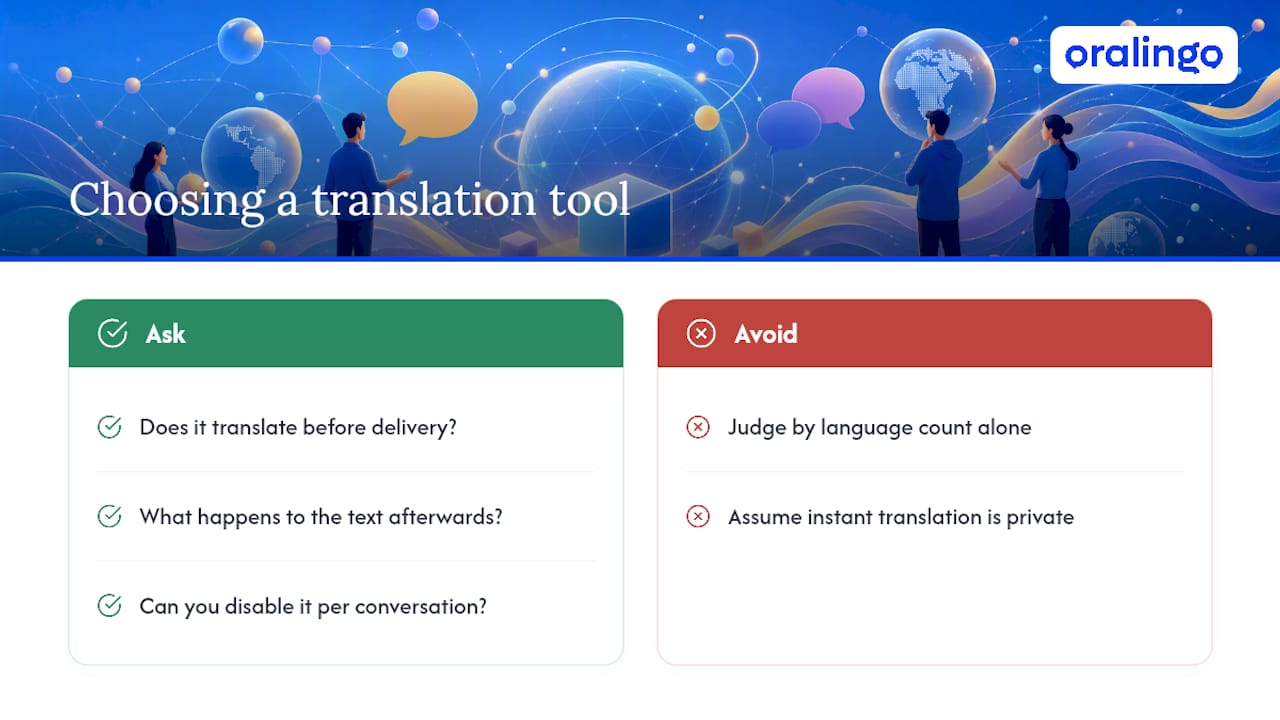
Most guides on this topic focus on language count and call it a day. That misses the real question. A conversation stalls the moment you have to stop and tap a button to see what someone meant. Pre-delivery translation exists because natural back-and-forth depends on removing that pause entirely, not just making it faster.
The harder trade-off is between that seamlessness and privacy. A tool that translates instantly usually needs to see your message somewhere along the way, whether that's a cloud API or the platform's own server. The honest answer isn't to pick one over the other. It's to ask any tool you're considering three things: does it translate before or after you see the message, what happens to your text once it's translated, and can you turn it off for sensitive conversations without losing the feature entirely.
— Poul
Talk Naturally in Any Language With Oralingo
Everything covered above points to the same conclusion: the best inline translation feels invisible, respects your privacy, and doesn't force you to choose between speed and security. Oralingo was built around that exact standard.

A dedicated app can translate messages before they are delivered, supporting conversations across many languages so they read naturally instead of choppily. Some apps offer hands-free voice mode to let you speak instead of type, and maintain end-to-end encryption to protect conversations. This kind of tool suits business professionals coordinating across time zones, students abroad staying in touch with family, and couples navigating relationships across languages. If the checklist above matters to you, namely pre-delivery speed, broad language coverage, and privacy that doesn't get compromised for convenience, try Oralingo and start your next conversation without the usual back-and-forth of manual translation.
Sources
- Translate a message in Microsoft Teams - Microsoft Support
- Translate messages in Zoom Chat - Zoom Support
- Chat Live Translation - Google Cloud documentation
- Set up real-time message translation | TalkJS Documentation