
The best approach to business chat translation is to configure platform-native real-time translation where it exists, back it with brand glossaries, and layer in human review for high-stakes content. That combination keeps conversations moving without sacrificing accuracy.
Top benefits at a glance:
- Speed: messages translate before delivery, so both sides read in their own language with no extra steps
- Operational continuity: agents and teammates stay in their native language while the system handles the conversion automatically
Platforms to check first:
- Microsoft Teams for internal and external chat
- Dynamics 365 real-time translation for customer service and contact-center workflows
- Azure Translation Services as the cloud API backbone for enterprise integrations
Key Takeaways
Real-time business chat translation works best when platform-native features, brand glossaries, and human review are combined into a single, well-configured workflow.
| Point | Details |
|---|---|
| Start with platform-native tools | Microsoft Teams and Dynamics 365 both offer built-in translation that requires no extra API cost to activate. |
| Glossaries are non-negotiable | Loading brand terms and product names into your MT glossary prevents the most common translation errors before they reach customers. |
| Agent language settings matter | Agents composing in their configured profile language produce more accurate outbound translations than those who mix languages. |
| Check encryption and consent | Confirm encryption in transit and at rest, review your MT provider's log retention policy, and add consent disclosures to your chat interface. |
| Oralingo for one-to-one and voice | Oralingo offers pre-delivery translation, hands-free voice mode, 100+ languages, and end-to-end encryption for mobile business conversations. |
Table of Contents
- How does real-time business chat translation actually work?
- Where can you deploy multilingual business chat today?
- What are your practical options for enterprise chat translation?
- Step-by-step checklist to deploy chat translation in your business
- Privacy, security, and compliance for U.S. businesses
- How accurate is machine translation in live chat, and how do you improve it?
- Why Oralingo is worth considering for one-to-one business chat translation
- Oralingo makes one-to-one business translation simple
- Sources
How does real-time business chat translation actually work?
Every real-time translation pipeline follows the same core sequence: a message is sent, a translation engine processes it, and the translated text is delivered to the recipient before they read it. The whole cycle typically completes in under a second for text-based chat.
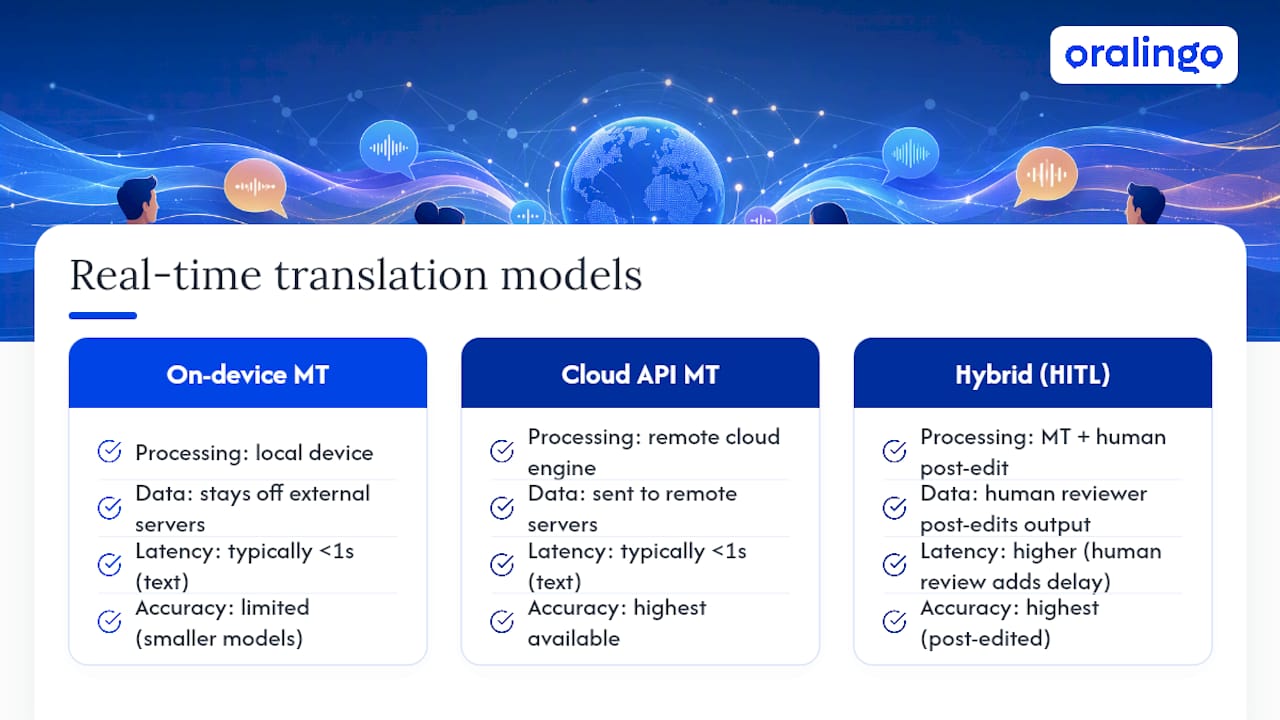
There are three main delivery models. Client-side on-device machine translation (MT) runs locally on a phone or laptop, which keeps data off external servers but limits model size and accuracy. Cloud API MT (such as Azure Translation Services) sends the message to a remote engine, gets a translated string back, and displays it. This model offers the highest accuracy and supports the widest language range. Hybrid with human-in-the-loop adds a post-editing step where a human reviewer corrects the MT output before delivery, used for legal, regulatory, or executive communications where errors carry real consequences.
Voice translation adds a step: speech is transcribed first, then the transcript runs through the MT pipeline. That transcription layer adds latency, which is why voice translation feels slightly slower than text. For most business chat use cases, cloud MT handles text fast enough that the delay is invisible to users.
Language detection runs automatically in most platforms. The engine scores incoming text against known language models and assigns the most probable language. One practical risk: short messages or code-switching (mixing two languages in one message) can confuse the detector and produce a wrong-language translation. Microsoft's Dynamics 365 documentation recommends enabling score-based language detection to stabilize conversation language when a customer occasionally switches.
Pro Tip: Set each agent's profile language explicitly in your CRM or platform settings. When the system knows the agent's primary language, it anchors outbound translation to that language and reduces misdetection on short replies like "Got it" or "One moment."
Where can you deploy multilingual business chat today?
Four practical environments cover most enterprise needs.
Microsoft Teams has built-in message translation available to all users. Any user can right-click a message and translate it on demand. Admins can also enable automatic translation so messages display in each user's configured language by default. No third-party API key is required for this feature. Setup lives in the Teams admin center under messaging policies.

Dynamics 365 Customer Service / Omnichannel supports a dedicated real-time translation plug-in. Enabling it requires admin access to the Copilot Service admin center, a configured web resource URL pointing to your translation provider, and a default input language setting. Microsoft recommends Azure Translation Services as the provider, and some integrations require the global endpoint rather than a regional one. Score-based language detection is a toggle in the same configuration panel.
Azure Translation Services is the API layer that powers Dynamics 365 translation and can be embedded in any custom CRM, contact-center platform, or internal tool. You provision an Azure Cognitive Services resource, generate an API key, and call the translation endpoint from your application. It supports 100+ languages and allows custom glossaries through the Custom Translator feature.
Mobile apps and SDKs handle one-to-one and small-group scenarios. Oralingo, for example, translates messages before delivery on both iOS and Android, with no separate middleware needed.
For CRM and contact-center workflows, keep translation inside the agent workspace rather than routing messages through separate middleware. A separate middleware layer adds latency, creates an extra data-handling point, and increases the chance of a translation log sitting outside your governance perimeter.
Key prerequisites before you start:
- Admin rights in Teams, Dynamics 365, or your CRM
- An Azure subscription and API key if using Azure Translation Services
- Consent and recording notification settings reviewed and configured
- A supported-languages list checked against your actual customer base (not every platform supports every language pair equally)
For a deeper look at multilingual collaboration platforms and how they fit different enterprise stacks, that guide covers integration patterns in more detail.
What are your practical options for enterprise chat translation?
Three categories cover the full range of business needs.
Built-in platform features (Teams, Dynamics 365) are the fastest to deploy and carry no extra licensing cost beyond your existing subscriptions. They work well for internal teams and standard customer support. The trade-off is limited customization: glossaries and domain-trained models are either unavailable or require additional configuration.
Third-party enterprise translation services integrate directly into CRM and contact-center platforms and offer deeper customization: domain-trained MT models, brand glossaries, translation memory, and dedicated data governance controls. They suit regulated industries or businesses where terminology precision directly affects customer trust or legal compliance.
Human-in-the-loop / hybrid workflows pair MT output with human post-editing before delivery. This is the right choice for legal notices, investor communications, executive correspondence, and any content where a mistranslation carries financial or reputational risk. The latency is higher, but the accuracy ceiling is also higher.
| Dimension | Built-in platform features | Third-party enterprise services | Human-in-the-loop / hybrid |
|---|---|---|---|
| Speed | Near-instant | Near-instant | Minutes to hours |
| Accuracy | Good for general language | High with domain training | Highest |
| Integration depth | Native to platform | Deep CRM/API integration | Varies by workflow |
| Data governance | Platform-managed | Vendor-specific controls | Full control |
| Cost | Included in license | Additional subscription | Per-word or hourly |
| Scalability | High | High | Limited by reviewer capacity |
Quick recommendations by use case:
- Customer support chat: built-in platform features or third-party enterprise services with glossaries
- Internal cross-border team chat: built-in platform features (Teams) with a configured default language
- Executive or legal communication: human-in-the-loop review, with MT as a first draft only
Step-by-step checklist to deploy chat translation in your business
The recommended rollout runs from a small pilot to full enterprise scale. Start narrow, validate quality, then expand.
- Define scope. List the language pairs you actually need based on your customer or team data. Prioritize the top three to five pairs for the pilot.
- Choose your platform approach. Match the option category (built-in, third-party, hybrid) to your use case and risk profile using the criteria above.
- Configure admin settings. For Teams, update messaging policies. For Dynamics 365, set the web resource URL, default input language, and enable score-based language detection per the Microsoft Learn guide. For Azure, provision your resource and store the API key securely.
- Build your glossary and translation memory. Load brand terms, product names, and prohibited translations into your MT provider's custom glossary. A translation memory and term base ensures consistent output across all agents and channels.
- Configure consent and recording settings. Review your recording notification obligations and add consent flows to your chat interface where required.
- Train agents. Show agents how to set their profile language and explain why composing in their configured language produces better outbound translations. The Zendesk guidance on this point is clear: mixing languages in outbound messages reduces MT accuracy.
- Run QA and UAT. Test with real message samples before go-live.
- Monitor and iterate. Track translation quality scores, agent feedback, and customer satisfaction after launch. Adjust glossaries and detection settings based on what you find.
Timing: a focused pilot covering two to three language pairs typically takes two to four weeks from configuration to sign-off. A full enterprise rollout across multiple platforms and regions runs eight to twelve weeks depending on integration complexity and legal review.
Pro Tip: During QA, test these specific message types: single-word replies ("Yes," "No," "OK"), messages with product acronyms, and messages where a customer switches language mid-conversation. These are the cases most likely to expose detection errors or glossary gaps before go-live.
Privacy, security, and compliance for U.S. businesses
The most important checks are encryption in transit and at rest, recording and consent notifications, data residency, and translation log retention.

Encryption: confirm your translation provider encrypts messages both in transit (TLS) and at rest. For Oralingo, end-to-end encryption is built into the product. For cloud API providers like Azure, encryption is standard, but verify your configuration.
Recording and consent: Microsoft's platform documentation explicitly notes that customers are responsible for any required consent and recording notification obligations. In the U.S., consent requirements vary by state. Some states require all-party consent for recorded conversations. Add a consent disclosure to your chat interface before translation and recording begin.
PII in translation logs: check whether your MT provider stores message content after translation. Some cloud APIs retain logs for model improvement by default. Review your vendor's data retention policy and opt out of content logging if your industry requires it (healthcare, finance, legal).
Practical compliance checklist:
- End-to-end or in-transit encryption confirmed
- Translation log retention policy reviewed and set to your required period
- Admin audit trails enabled
- PII handling reviewed with your legal or compliance team
- Consent flow integrated into the chat interface
- Data residency confirmed (U.S. region endpoints where required)
For contact centers in regulated industries, keep translation logs for the same period as your call and chat records to support complaint investigations and audit requests.
How accurate is machine translation in live chat, and how do you improve it?
Machine translation handles general business language well. It struggles with industry jargon, brand-specific terms, very short messages, and code-switching. The gap between translation (converting words) and localization (adapting tone, cultural context, and format) is real and matters for customer-facing communication.
Practical steps to raise quality:
- Load a glossary. Map your product names, legal terms, and brand phrases to their correct translations in every target language. This single step prevents the most common and embarrassing errors.
- Use translation memory. Store approved translations of common phrases so the system reuses them consistently rather than generating a new version each time.
- Write in your configured language. Agents who compose replies in their profile's primary language get better outbound translations. Mixing languages in a single message degrades output quality.
- Use message templates for high-frequency responses. Pre-translated templates for greetings, escalation notices, and closing messages eliminate MT risk entirely for those exchanges.
- Flag content for human review. Legal notices, refund decisions, regulatory disclosures, and messages to high-value customers should route to a human reviewer before delivery.
What agents should avoid:
- Slang, idioms, and humor (these rarely translate accurately)
- Very long sentences with multiple clauses
- Abbreviations and acronyms not in the glossary
What agents should prefer:
- Short, direct sentences
- Standard business vocabulary
- One idea per message
For high-stakes content, specialist human review remains the standard. Corporate translation services consistently recommend specialist linguists for legal, financial, and investor communications where accuracy and tone are critical.
Why Oralingo is worth considering for one-to-one business chat translation
Oralingo translates messages before they are displayed, so both sides of a conversation read in their own language without any extra taps or steps. It supports 100+ languages, preserves message tone and context, and uses end-to-end encryption on every conversation.
The hands-free voice mode sets it apart for business scenarios where typing is impractical: a sales call with an overseas partner, a site visit with a non-English-speaking contractor, or a quick check-in with a remote team member in a different country. You speak, Oralingo translates, and the other person hears or reads in their language.
For business users, the key features are:
- Pre-delivery translation (no post-send editing needed)
- Custom language and voice settings
- Tone and context preservation
- End-to-end encrypted messaging
- iOS and Android availability with a subscription model for premium features
Oralingo fits best in one-to-one and small-group scenarios: remote workers coordinating across borders, business travelers, and professionals who need a private, mobile-first translation tool outside their main CRM or team platform. For a deeper look at real-time chat translation and how the technology works in practice, that guide covers the technical details.
What teams often get wrong about chat translation rollouts
Most teams underestimate the glossary step. They configure the platform, run a quick test with a few generic phrases, and declare the pilot a success. Then a customer asks about a specific product feature, the MT engine renders the product name incorrectly, and the agent has no idea because they can't read the customer's language.
The other common mistake is treating machine translation as a finished product rather than a starting point. MT is fast and good enough for most general exchanges. But "good enough" is not the same as "accurate enough" for a refund dispute, a compliance notice, or a conversation with a high-value client. The teams that get the most out of chat translation are the ones that build a feedback loop: agents flag bad translations, the glossary gets updated, and quality improves over time. Speed and quality controls are not opposites. You can have both if you set up the system correctly from the start.
Oralingo makes one-to-one business translation simple
Most enterprise translation setups require admin configuration, API keys, and IT involvement. Oralingo skips all of that. You get real-time, pre-delivery translation for text and voice conversations, with 100+ languages and end-to-end encryption, directly on your phone.

For business professionals who need to communicate across languages outside of a CRM or team platform, Oralingo is the practical, private option. No middleware, no complex setup, no messages stored on third-party servers. Just clear, accurate conversation in any language. Download Oralingo from the App Store or Google Play and run a pilot conversation with a colleague or partner today.
Sources
These are the canonical platform docs and industry resources to check for precise setup steps and policy details.
- Enable real-time translation - Microsoft Learn
- Translate a message in Microsoft Teams - Microsoft Support
- Business Translation: What It Is, and How to Manage It | Phrase
- Understanding conversation translation - Zendesk Support