
You preserve tone, punctuation, emojis, and informal styling in live chat and voice by using a context-aware translation pipeline that carries prior bilingual turns, keeps markup intact, and applies quality-aware decoding to pick the best candidate. That combination is what lets a translated message still sound like your friend, not a customer service bot.
Here is what this actually protects in your messages:
- Tone and register (casual versus formal, sarcasm, warmth)
- Punctuation, ellipses, and sentence fragments
- Emojis and skin-tone modifiers
- Informal capitalization ("lol" versus "LOL")
- Line breaks and message structure
- Interim voice transcripts before they get finalized
Researchers have validated this with metrics like COMET and CHRF, which score how well a translation holds up against human judgment across full conversations, not just isolated sentences. Oralingo builds its chat and voice translation around this exact approach.
Pro Tip: Open your translation app's settings right now and turn on "conversation history" or "context mode" alongside any "preserve formatting" toggle. That pairing is the single biggest lever you have.
Key Takeaways
Preserving formatting in translation works when a context-aware pipeline, markup-preserving rendering, and quality-aware decoding operate together rather than separately.
| Point | Details |
|---|---|
| Context beats isolation | Feeding prior bilingual turns into translation prompts fixes pronoun drift and register loss that sentence-by-sentence systems miss. |
| Six to ten turns is usually plenty | Wider context windows help ambiguous conversations but add latency with diminishing accuracy gains beyond that range. |
| Markup and emojis need explicit handling | Bold, italics, ellipses, and emojis require dedicated preservation rules, not default translation behavior. |
| Voice needs buffering, not instant output | Waiting for punctuation or a short pause before speaking prevents broken, robotic-sounding synthesized speech. |
| Oralingo applies this checklist directly | Its chat and voice translation combines conversation history, markup preservation, hands-free voice mode, and end-to-end encryption in one app. |
Table of Contents
- How Context-Aware Translation Keeps Meaning and Formatting Intact
- What Rules Keep Punctuation, Emojis, and Line Breaks Intact?
- How Do You Keep Tone Natural in Voice Translation?
- How Many Conversation Turns Should a Translation App Remember?
- Balancing Privacy With Formatting Accuracy
- What Should You Look for in a Formatting-Preserving Translation App?
- What Evidence Backs Context-Aware Formatting Preservation?
- Why Tone and Formatting Are the Whole Point of Translation
- Try a Chat Translator Built to Keep Your Voice Intact
- Frequently Asked Questions
- Sources
How Context-Aware Translation Keeps Meaning and Formatting Intact
Sentence-by-sentence translation is where formatting problems start. Feed a model one isolated line and it has no idea whether "sure" is enthusiastic agreement or dry sarcasm, or whether "she" refers to your sister or your coworker. Context-augmented translation fixes this by feeding the model prior turns from the conversation, in both languages, before it translates the current message.
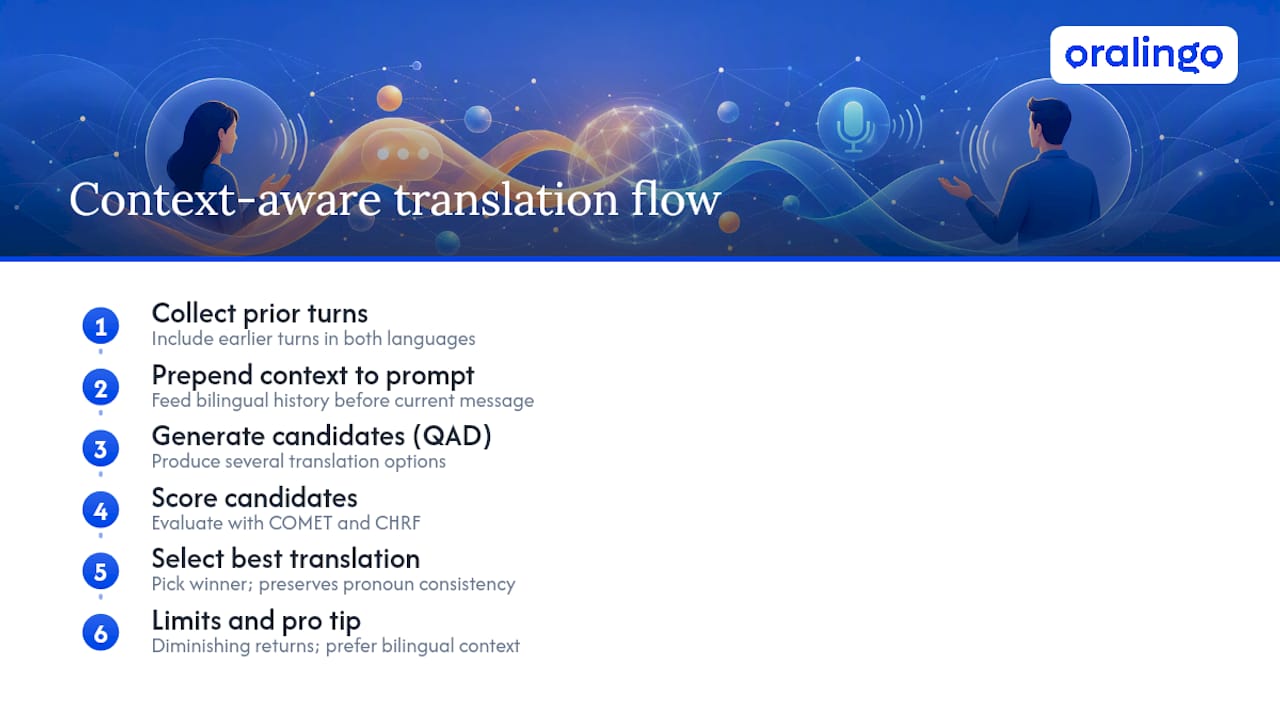
A TACL research paper on context-aware bilingual conversation translation found that including previous bilingual turns in the prompt measurably improved both CHRF and COMET scores across multiple language pairs from the WMT24 benchmark. The gains were largest on segments that started out low quality, exactly the messy, ambiguous chat messages that trip up simpler systems.
Quality-aware decoding (QAD) adds a second layer. Instead of accepting the first translation a model generates, QAD produces several candidates and scores them against context-aware metrics like COMET and CHRF, then picks the winner. This is how a pronoun stays consistent across ten messages instead of drifting.
There's a ceiling, though. The same research found diminishing returns once context stretched beyond a certain number of turns. More history isn't automatically better.
Pro Tip: When your app offers a choice, favor bilingual original-turn context over English-only summaries. Bilingual context preserves nuance that translating everything into English first tends to flatten, according to the same TACL findings.
What Rules Keep Punctuation, Emojis, and Line Breaks Intact?
Formatting preservation lives in the details most translation apps ignore. Here's what actually needs to happen behind the scenes.
Inline markup like bold and italics has to survive the round trip. Feature sets built for chat translation, including those documented for message translation in WordPress chat, preserve HTML-style formatting and give you a toggle to flip between original and translated text. That toggle matters more than it sounds. It lets you double-check tone without losing the thread.
- Emojis stay as emojis; they're rarely translated into words, and skin-tone modifiers pass through unchanged.
- Ellipses and sentence fragments map to their equivalent in the target language rather than getting "corrected" into full sentences.
- ALL CAPS emphasis and casual lowercase style carry over instead of getting auto-capitalized.
- Line breaks and list-style spacing are preserved, not collapsed into one paragraph.
- Slang and code-switching (mixing two languages mid-sentence) get flagged for a quick human glance rather than silently mistranslated.
Pro Tip: Test any translation app with one throwaway message that mixes emojis, an ellipses pause, and a line break. If all three survive the round trip, the formatting engine is solid.
How Do You Keep Tone Natural in Voice Translation?
Voice translation runs through more moving parts than text: speech recognition, context-aware machine translation, quality-aware reranking, and text-to-speech, sometimes with a cloned voice on the output end.
The trickiest part is timing. Speech recognition produces interim transcripts word by word, and if the system feeds those straight into text-to-speech, you get robotic, chopped-up audio speaking half a sentence before you've finished it. Engineering guidance for live meeting translation recommends buffering until punctuation appears or the speaker pauses for roughly two seconds before triggering speech output.
Prosody, the rise and fall of your voice, needs to map onto the translated audio too. A question needs to sound like a question in the target language, with rising intonation preserved at the sentence end, not just accurate words in a flat tone.
Voice cloning adds intimacy, hearing something closer to your own voice speak the translation, but it typically adds a small processing overhead in production.
Pro Tip: Set a fallback to captions if latency creeps past a short threshold to avoid dead air, which is worse than reading a caption briefly.
How Many Conversation Turns Should a Translation App Remember?
Research on context-aware translation suggests a modest number of prior turns typically covers most language pairs well, though some pairs benefit from a longer window depending on how much pronoun and formality tracking the grammar requires.
Piling on more history isn't free. Every additional turn adds compute and latency, and the TACL research already showed the quality gains taper off past a certain point. The smarter move is selective: apply the full context window only when a segment's estimated quality looks shaky, and lean on a shorter window otherwise.
- Everyday messaging: 4 to 8 turns is usually enough.
- Ambiguous or domain-specific conversations (medical, legal, technical): widen the window.
- Quick back-and-forth exchanges: a shorter window keeps things snappy without hurting accuracy.
Balancing Privacy With Formatting Accuracy
Carrying conversation history to preserve tone means that history has to live somewhere, even briefly, and that raises real privacy questions.
Look for end-to-end encryption on every message, on-device processing for short context windows when the app supports it, and transient memory policies so history doesn't sit around longer than it needs to. Voice cloning should require explicit consent, not a default-on setting.
- Pre-delivery translation (buffering before showing you the message) improves accuracy and formatting at the cost of a small delay.
- Immediate streaming favors speed but risks half-formed, awkward output.
- Apps should let you toggle between original and translated text at any time.
- High-stakes content, contracts, medical instructions, legal notices, should escalate to a human translator rather than rely on chat translation alone.
What Should You Look for in a Formatting-Preserving Translation App?
Run through this checklist before you commit to an app for daily chat or voice translation:
- Bilingual conversation history, not just single-message translation
- Markup and emoji preservation with a toggle for original text
- Selective context windows that adjust automatically to conversation complexity
- Quality-aware decoding or reranking to avoid the "first guess" trap
- Interim-versus-final flags so voice transcripts don't get spoken too early
- Voice cloning or natural TTS options, with consent controls
- End-to-end encryption on every conversation
- A latency safeguard that falls back to captions when synthesis lags
To set it up, turn on "preserve markup" and "conversation history" first, enable punctuation-aware speech recognition if it's offered, and switch on buffered text-to-speech so voice output waits for natural pause points. Oralingo is built around this exact checklist, pairing real-time chat translation with hands-free voice mode and encrypted messaging by design.
Pro Tip: Test three things first: emoji consistency across five messages, whether pronouns stay attached to the right person over a longer exchange, and how the voice mode handles a pause mid-sentence.
What Evidence Backs Context-Aware Formatting Preservation?
Context-augmented instruction genuinely improves discourse modeling. Bilingual prior-turn context tends to outperform English-only summaries because it preserves language-specific nuance that flattens when everything gets funneled through one intermediate language, according to the TACL framework.
- COMET and CHRF are the two metrics researchers lean on to measure this.
- Gains concentrate on lower-quality segments, the messy, ambiguous chat lines that used to fail hardest.
- Improvements hold across multiple language pairs tested in the WMT24 benchmark, not just one.
The practical upshot: word-for-word translation breaks down specifically on dropped subjects, pronoun tracking, and register. Systems that accumulate dialogue history instead of translating isolated segments handle exactly those failures better.
Why Tone and Formatting Are the Whole Point of Translation
Translation that strips out your tone hasn't really translated your message, it's delivered a different one. When your sister texts you three exclamation points and a laughing emoji, and the translation strips that down to a flat sentence, something real gets lost between you. That gap is what pushed the context-aware research behind this article, and it's why Oralingo treats punctuation and emojis as data worth protecting, not noise to clean up.
Business conversations carry the same stakes in a different key. A curt-sounding translation of a warm message can read as cold to a client, and that misread costs more than a mistranslated word ever would. If you're ready to see how a context-aware chat translator handles your own conversations, Oralingo is built to keep that first exclamation point right where you put it.
Try a Chat Translator Built to Keep Your Voice Intact
Most translation tools give you a technically correct sentence and call it done. Oralingo goes further by carrying your conversation's history, markup, and emojis through the entire translation, so the message that lands still sounds like you and not a machine's best guess.

Every conversation on Oralingo runs on end-to-end encryption, and the app translates messages before they're even displayed, so there's no awkward half-second where you're staring at the original text. Hands-free voice mode means you can have a real spoken conversation across 100+ languages without typing a word, and custom language and voice settings let you tune it to how you actually talk. If you want to see how it handles your own texting style, punctuation habits and all, try Oralingo and run a real conversation through it today.
Frequently Asked Questions
Does preserving formatting in translation slow down real-time chat? It can add a small delay, since pre-delivery translation buffers a message briefly to check punctuation and context before displaying it. That trade-off usually improves accuracy enough to be worth a fraction of a second.
Can emojis get lost or changed during translation? Well-built systems pass emojis through unchanged rather than translating them into words, including skin-tone modifiers. If an app strips emojis or swaps them for text descriptions, that's a sign its formatting preservation isn't complete.
Why does my translated voice message sound robotic? That usually happens when the text-to-speech engine speaks an interim transcript before the sentence finishes. Apps that buffer until a pause or punctuation mark, as recommended in engineering guidance for live translation, avoid this.
How much conversation history does an app need to remember for accurate translation? Six to ten prior turns covers most everyday conversations well. Ambiguous or technical exchanges may benefit from a longer window, while quick back-and-forth chats work fine with less.
Is it safe to use real-time translation for sensitive or legal conversations? Chat and voice translation apps work well for everyday conversation, but human interpreters remain recommended for legal, medical, or other high-stakes content where a mistranslation carries real consequences.
Sources
- This work presents a context-aware framework for improving translation quality in bilingual conversations (TACL paper)
- Live Meeting Translation in 2026: Built-In, Vendor, or Build
- AI Message Translation in WordPress Chat (feature doc)