
A real-time, pre-delivery chat translator can turn any Facebook Messenger one-to-one conversation into two conversations happening in two languages at once, with each person reading and hearing their own. It works well for casual chats, travel logistics, and everyday business coordination. Expect a short delay for text and slightly more for voice, and always route contracts, legal, or medical messages to a human translator instead of trusting AI alone.
TL;DR:
- Using high-quality engines and custom glossaries enhances translation accuracy, especially for names, brands, or idioms, and should be set up before important conversations.
- Secure translation apps must offer end-to-end encryption, short data retention, and clear consent options, with security certifications like ISO 27001 or SOC 2 being a strong sign of trust.
- AI translation performs well for casual, routine chats and travel coordination but requires human review for legal, medical, or sensitive business messages to prevent harmful errors.
- Testing a translation app with trusted contacts and building personalized glossaries ensures better accuracy and smoother experience before relying on it for crucial conversations.
Table of Contents
- How Does Real-Time Translation Work on Messenger Chats?
- How to Set Up a Real-Time Translator for Messenger Chats
- How Does Hands-Free Voice Mode Work?
- What to Check Before Trusting an App With Private Chats
- When Should You Trust AI Versus a Human Translator?
- What I've Learned Piloting Real-Time Translation Tools
- Oralingo: Real-Time Translation Built for Private Messenger Chats
- Sources
- FAQ
How Does Real-Time Translation Work on Messenger Chats?
Every translated message follows the same basic path: capture, translate, deliver. For text, the app reads what you type, sends it to a translation engine, and displays the translated version. For voice, it adds a step: automatic speech recognition turns your spoken words into text before translation even starts.
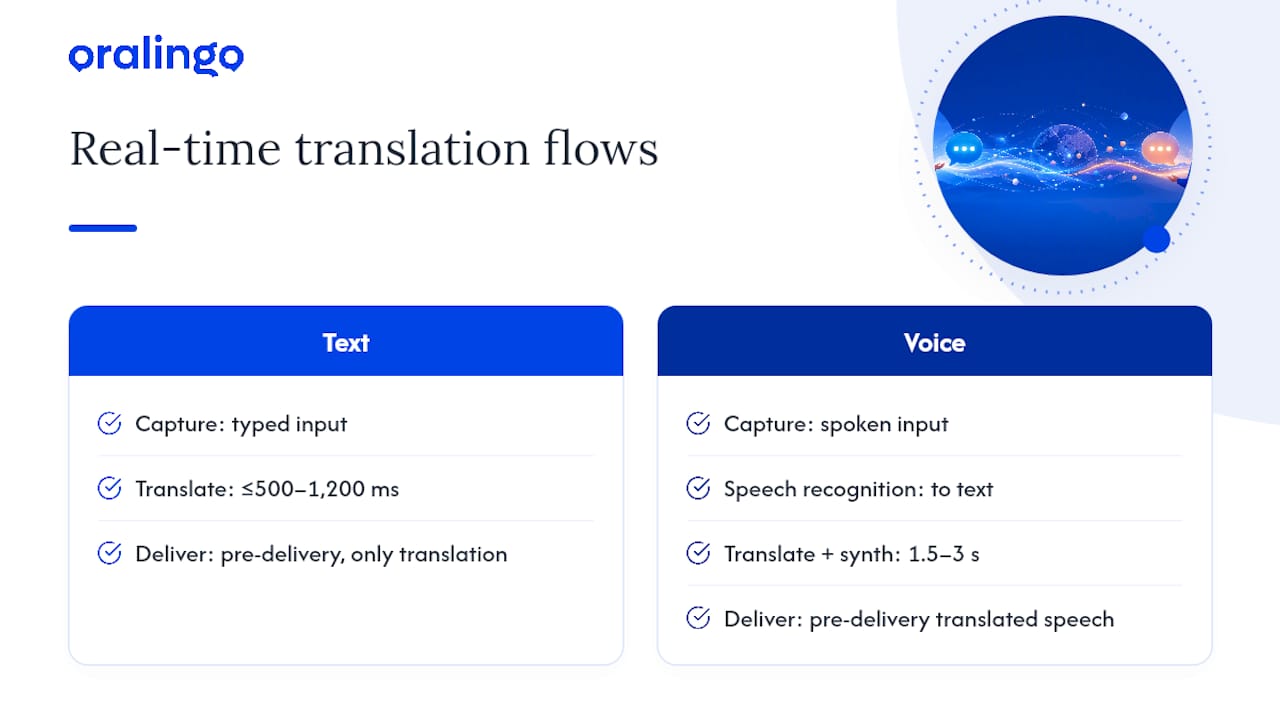
The order of operations is what separates a good real-time translator from a clunky one. With pre-delivery translation, the message gets translated before it shows up in the chat, so your friend in Lisbon never sees your original English text at all. They just see Portuguese, and the conversation feels like one continuous thread instead of a back-and-forth translation exercise.
That's different from how a lot of chat platforms handle multilingual messaging by default. Many implementations send the original message immediately, then follow up with a translated version a moment later, so the chat feels fast even though the translation itself lags slightly behind delivery. That pattern works fine for group chats and forums. For a private one-to-one conversation, it can feel disjointed, since one person sees the raw text first and the translation second.
Speed matters here. Text translations in a well-built pipeline typically land in under 500 milliseconds, sometimes stretching to 1,200 milliseconds depending on message length and network conditions. Voice adds real overhead: expect 1.5 to 3 seconds for a full speech-to-speech round trip, since the system has to transcribe, translate, and then resynthesize speech.
Quality depends heavily on the engine behind the scenes. Basic machine translation tools do fine with simple sentences but stumble on tone, sarcasm, and idioms. Large language model based translation handles context better, and pairing it with a custom glossary sharpens accuracy further, especially for names, brand terms, and phrases that don't translate literally.
How to Set Up a Real-Time Translator for Messenger Chats
Getting a translator running alongside your Messenger conversations takes about five minutes. Here's the sequence:
- Download and install a real-time chat translation app and grant it microphone access (for voice) and notification permissions (so translated messages arrive promptly).
- Set your language. Choose your preferred display language, or turn on automatic detection so the app figures out what language your contact is typing in.
- Turn on pre-delivery translation. This is the setting that translates a message before it appears in your chat window, rather than showing the original first and translating after.
- Activate hands-free voice mode when you want to talk instead of type, whether that's a live call or a quick voice note.
- Run a test conversation with a contact you trust before using the app for anything important. Send a few normal messages back and forth and confirm both sides read cleanly.
A couple of operational habits make a real difference once you're up and running. Skip translating one-word replies like "ok" or "lol," since translating filler text adds latency without adding value. Add recurring names, nicknames, or brand terms to a glossary early. Caching frequent short phrases and skipping tiny tokens is a known pattern for keeping chat translation fast without burning unnecessary processing power.
Pro Tip: Build your glossary before your first real conversation, not after. Five minutes spent adding a family nickname or a product name up front saves you from awkward mistranslations later.
How Does Hands-Free Voice Mode Work?
Voice mode follows a longer chain than text: your speech gets captured, streamed to an automatic speech recognition engine, translated, and then either spoken back through text-to-speech or shown as a live caption. That extra step is why voice typically runs 1.5 to 3 seconds behind real speech, compared to well under a second for text.
That gap changes how a conversation feels. It's fine for a phone call with a supplier overseas or a chat while walking through a market abroad, where a beat of delay barely registers. For a fast-paced meeting where you need an exact written record, captions or text mode usually work better than spoken translation. And since live audio is being processed in real time, it's worth a quick reminder: check what happens to that audio stream before you rely on voice mode for anything sensitive.
What to Check Before Trusting an App With Private Chats
Before you hand any app your Messenger conversations, run through a short security checklist. This matters more than most people realize, since "translation" means a third party is temporarily processing the content of your private messages.
- Confirm the app offers genuine end-to-end encryption, and ask whether translation happens inside that encrypted boundary or outside it.
- Check the data retention policy. Shorter retention windows are safer, and any use of your messages to train AI models should require explicit opt-in, not a buried default.
- Look for concrete security signals: TLS encryption in transit, AES-256 encryption at rest, and independent audit documentation such as ISO 27001 or SOC 2.
- Expect clear consent patterns: a visible indicator that translation is active, a per-session consent step, and an easy way to opt out message by message.
Security-first vendors treat these certifications and retention policies as required deliverables rather than nice-to-have extras, and that distinction should guide which app you trust with a real conversation.
When Should You Trust AI Versus a Human Translator?
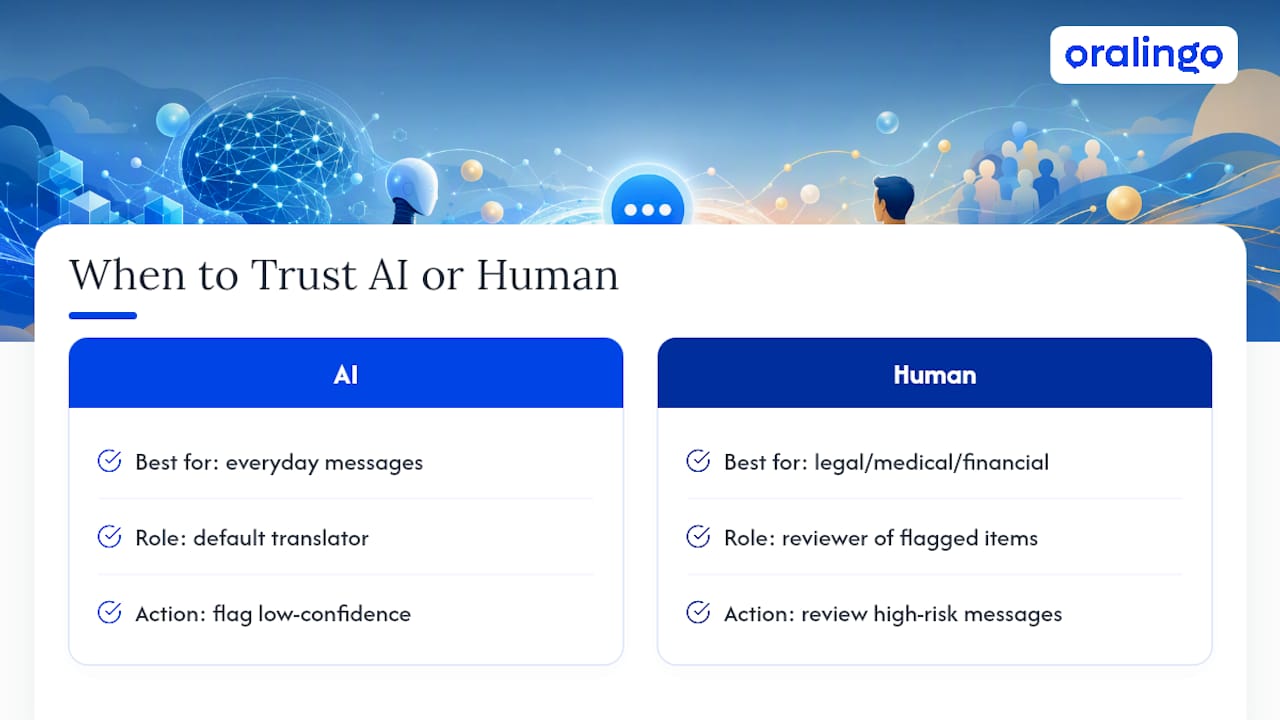
AI translation handles the bulk of everyday messaging well: catching up with family, coordinating travel plans, or working out a delivery schedule with a supplier. Accuracy in these situations tends to be high enough that small imperfections rarely change the meaning.
The calculation shifts for anything with legal, medical, or financial weight. Contract terms, medical instructions, and regulated business communication deserve a human translator in the loop, since a single mistranslated clause or dosage can cause real harm. The most practical approach combines both: let AI handle translation by default, and flag any message the system marks as low-confidence for a human to review before it matters.
What I've Learned Piloting Real-Time Translation Tools
The biggest mistake people make is skipping the pilot conversation. Before you use a translator for anything that counts, run a short test with a colleague or a family member. Send a handful of normal messages, note how the delay feels, and adjust between voice and caption mode based on what feels natural for that specific relationship.
Glossaries deserve more attention than most guides give them. A handful of entries for names, nicknames, and recurring business terms fixes the errors that actually annoy people, far more than chasing marginal gains in general translation accuracy. Build that list early, and adjust it as new terms come up.
— Poul
Oralingo: Real-Time Translation Built for Private Messenger Chats
Oralingo translates messages before they hit the screen, so a Messenger conversation between you and someone across the world reads naturally in both directions instead of showing raw text first. It supports over 100 languages, keeps tone and context intact rather than flattening every sentence into robotic phrasing, and offers a hands-free voice mode for when typing isn't practical.

Every conversation can run on end-to-end encryption, so the privacy checklist above should be a baseline for secure apps. If you want to see how the pipeline behaves with your own contacts, download Oralingo and run a short pilot chat exactly like the one described earlier: pick a trusted contact, send a few normal messages, and check your language and privacy settings before moving on to anything that matters.
Sources
- Real-Time Chat Translation
- Humans in the loop: How AI translations benefit from human involvement
- Real-Time Translation for Chat Apps — auto18n
- What security standards should automatic speech translation meet?
FAQ
Does Translation Slow Down My Messenger Conversations?
Text translation typically adds under 500 to 1,200 milliseconds, which most people barely notice mid-conversation. Voice mode adds more, usually 1.5 to 3 seconds, since speech has to be transcribed, translated, and resynthesized.
Which Languages Can a Real-Time Messenger Translator Support?
Coverage varies by app, but leading real-time translators support over 100 languages, covering the vast majority of Messenger's international user base.
Is It Safe to Translate Private Messenger Chats With an App?
It's safe when the app maintains end-to-end encryption, uses short data retention windows, and doesn't repurpose your messages to train models without your consent. Check for TLS transport, AES-256 encryption at rest, and audit documentation like ISO 27001 or SOC 2 before trusting an app with sensitive conversations.
Can AI Translation Handle Business or Legal Messages?
AI handles routine business coordination well, but legal, medical, or contract-critical messages should go through human review since a single mistranslated term can carry real consequences.
What's the Difference Between Pre-Delivery and Post-Send Translation?
Pre-delivery translation shows the translated message directly, without displaying the original first, which keeps a one-to-one conversation feeling continuous. Post-send translation shows the original message immediately and follows with a translation moments later, a pattern more common in group chats and forums.