
Meeting chat translation, in the sense that matters for individuals and small groups, means translating a text or voice message before it ever appears or plays back to the other person. If you need that for a one-on-one conversation, use a privacy-first mobile app built specifically for pre-delivery translation, one with a hands-free voice mode and end-to-end encryption, and run a five-minute pilot with a real partner before you trust it with anything important. This type of app is built for exactly this job.
TL;DR:
- A pre-delivery chat translation app must deliver messages in one or two seconds with true two-way, language-pin support for reliable performance.
- Testing should include idiomatic expression accuracy, name preservation, and stable latency across networks before trusting the tool.
- Privacy depends on architecture choices; hybrid edge and device solutions offer low latency and strong security, especially for sensitive conversations.
- For best results, keep messages short, pause naturally during voice chats, and run a quick pilot to spot translation issues early.
- Running a five-minute real use test with a partner helps identify potential failures like lag, mistranslations, or tone loss before full reliance.
Table of Contents
- How One-on-One Pre-Delivery Chat Translation Actually Works
- How Do You Test a Chat Translation App Before You Trust It?
- What Should You Ask About Privacy Before You Translate Sensitive Chats?
- Setting Up a Chat Translator So Conversations Actually Flow
- Common Problems During Live Translated Chats and How to Fix Them
- Does a Chat Translator Work With the Apps You Already Use?
- Handling Chats With More Than Two Languages
- Real Situations Where Pre-Delivery Translation Makes a Difference
- Keeping the Conversation Natural Despite Translation Delay
- A Simple Five-Minute Pilot Worth Running Yourself
- Try Oralingo for Your Next One-on-One Conversation
- Sources
How One-on-One Pre-Delivery Chat Translation Actually Works
Text and voice take different paths, but both aim for the same thing: you type or talk, the other person gets a message in their language, and nothing feels delayed or robotic.
For text, the pipeline runs like this:
- You write your message in your language.
- The app detects or pins the language (pinning avoids guesswork with short phrases).
- Machine translation converts it.
- The translated version displays to your contact before your original ever reaches their screen.
That last step is what "pre-delivery" means. Your contact never sees the source text and then a translation lagging behind it. They just see their language, immediately.
Voice works with more moving parts. Audio gets captured, run through automatic speech recognition, translated, and optionally converted back to speech through text-to-speech playback. Developer guidance from OpenAI's realtime translation documentation recommends streaming the process instead of waiting for a full sentence: show partial transcripts as someone talks, then finalize the translation once they pause. That single change is why some voice translators feel conversational and others feel like a phone tree.
Latency callout: One engineering team building an instant translation app documented average voice-translation latency under two seconds across many commonly used languages, using a device-plus-edge architecture and a single WebSocket connection multiplexing transcription, translation, and audio instead of firing off separate API calls for each step.
The architecture choice behind that speed matters. Processing entirely on your device protects privacy but limits translation quality for rare language pairs. Routing everything to the cloud usually improves accuracy but adds network round trips. A 2026 peer-reviewed study on privacy-preserving translation found that a hybrid edge and device design using WebRTC can deliver both low latency and strong security, which is the balance you actually want in a one-on-one chat.
How Do You Test a Chat Translation App Before You Trust It?
Do not judge a translator by its marketing page. Judge it by five to fifteen minutes of real use with someone who speaks the other language.
Before you run any test, confirm the app covers these basics:
- Latency. Does a translated message appear in one or two seconds, or does it lag noticeably behind typing?
- Two-way pre-delivery behavior. Does translation happen before display in both directions, not just one?
- Language coverage for your specific pair. Broad language counts mean little if your two languages are not both well supported.
- Voice and hands-free mode. Can you speak without touching the screen, and does playback sound natural?
- Glossary support. Can you lock in names, brand terms, or industry vocabulary so they don't get mistranslated?
- Platform compatibility. Does it work across the phones and operating systems you and your contact actually use?
- Encryption. Is the conversation encrypted end-to-end, and does the provider explain how?
Once those boxes are checked, run these timed tests with a real partner:
- Idiomatic phrase test: send a common expression ("it's raining cats and dogs") and see if the translation makes sense or falls apart literally.
- Two-way reply test: have your partner respond in their language and confirm the reply translates back cleanly.
- Code-switching test: mix two languages in one message, since detection algorithms can get confused by rapid switching. NeurIPS research on language detection found that manual language pinning consistently outperforms automatic detection in these mixed cases.
- Glossary and name preservation test: send a message with a proper name or technical term and check whether it survives translation intact.
- Cross-network test: try the same exchange on Wi-Fi and then on cellular data to see if latency holds up.
Pro Tip: Run the idiomatic phrase test first. If an app mangles a simple expression like "break the ice," it will struggle far more with contract language or medical terms later.
Red flags that should end the trial immediately: noticeable lag past three or four seconds, no way to lock a language pair, and any translation that changes names or numbers.
What Should You Ask About Privacy Before You Translate Sensitive Chats?
Before you paste anything financial, medical, or legal into a translator, find out exactly where that text and audio travel.
End-to-end encryption and cloud processing are not the same protection, and conflating them is a common mistake. End-to-end encryption means only you and your contact can read the message content, even the provider cannot see it in transit. Cloud processing for translation, on the other hand, often requires the text or audio to be decrypted somewhere, translated, then re-encrypted. Ask directly: where does translation happen, on the device or on a server, and how long are logs kept afterward?
A hybrid architecture combining WebRTC peer-to-peer connections with RSA-OAEP and AES-GCM cryptography can deliver low latency without exposing conversation content along the way, according to a 2026 peer-reviewed study on privacy-preserving chat translation.
For most personal and business conversations, automated translation is fine on its own. But for anything with legal weight, a contract clause, a medical diagnosis, an immigration document, treat the translation as a first pass, not a final answer, and bring in a human translator for verification.
Practical safeguards worth using:
- Favor apps that offer an on-device or minimal-retention mode.
- Use ephemeral or ask about auto-delete chat features for anything you would not want stored indefinitely.
- Check for consent prompts before a conversation starts routing through translation.
- When in doubt, ask before you type: "Is this conversation encrypted end-to-end?" A vague answer is itself an answer.
For more on what to look for in vendor policies, see this breakdown of secure business messaging translation.
Setting Up a Chat Translator So Conversations Actually Flow
A translator that works perfectly in a demo can still feel clunky in a real conversation if you skip the setup. A few minutes of preparation changes everything.
Before you start chatting:
- Agree on languages with your contact ahead of time, don't let the app guess.
- Pin both languages in the app settings if that option exists, especially if either of you sometimes mixes languages mid-sentence.
- Upload a short glossary with names, job titles, or industry terms you use often.
- Test your microphone and speaker volume before a voice call, not during it.
While you're chatting:
- Keep turns short. Long paragraphs give translation engines more room to lose context.
- Pause naturally between thoughts, especially in voice mode, so the system has a clean break to translate.
- Confirm dates, times, and numbers explicitly ("just to confirm, that's March 12th at 3 PM") since these details are the easiest to garble.
- If a term looks off in translation, ask your contact to clarify rather than assuming the translation is correct.
For hands-free voice specifically:
Find a quiet space. Background noise is still the single biggest cause of bad transcription, no algorithm fixes a loud coffee shop. Use headphones if you're on a call, both for your own audio quality and so the app doesn't pick up your contact's translated voice as new input. Test your text-to-speech voice and playback speed before an important call. A voice that talks too fast can undercut an otherwise accurate translation.
Pro Tip: Build your glossary the first time you catch a mistranslated name or term, not after it happens three more times. A thirty-second fix saves a much more awkward conversation later.
Common Problems During Live Translated Chats and How to Fix Them
The most frequent complaint with any translator is the awkward pause, that moment where you've finished typing or talking and you're just waiting. Usually this comes down to network conditions rather than the translation engine itself, so switching from cellular data to Wi-Fi, or vice versa, is worth trying before you blame the app.
Mistranslated names and technical terms are the second most common frustration. This is exactly what glossary features exist to solve: lock in your name, your company's name, and any recurring jargon so the engine stops guessing.
Tone loss is subtler but real. Sarcasm, humor, and warmth often flatten out in literal translation. If a joke falls flat on the other end, don't assume your contact is unresponsive, assume the translation stripped the tone and follow up with a plain-language clarification.
Code-switching, when you or your contact naturally slip between two languages in the same message, confuses automatic detection more than almost anything else. The fix is the same one covered in the testing section: pin your languages manually rather than relying on auto-detect.
Finally, voice cutting out mid-sentence usually points to a spotty connection rather than a translation failure. If it happens repeatedly, switch to text for anything that truly needs to land precisely, like an address or a price, and save voice for the more casual parts of the conversation.
Does a Chat Translator Work With the Apps You Already Use?
A one-to-one translation app does not need to replace your existing messaging habits, it needs to sit comfortably alongside them. Most people already text or call through their phone's default messaging app, a chat platform, or voice calls, and the value of a dedicated translator comes from working well as its own conversation space rather than trying to bolt onto every other app you use.
Look for compatibility across both iOS and Android, since mixed-device conversations, one person on an iPhone, the other on an Android phone, are common in international friendships and families. Check whether the app supports both text and voice within the same conversation thread, so you're not switching tools depending on whether you want to type or talk.
If you're weighing a dedicated one-to-one app against a broader platform, it helps to understand the category differences first. This overview of multilingual collaboration platform types breaks down when a focused chat translator beats a general-purpose tool, and when it doesn't. Teams juggling scheduled group conversations across time zones might also want to look at how multilingual team chat works for global teams as a point of comparison, even though that's a different use case from the one-to-one focus here.
Handling Chats With More Than Two Languages
One-to-one translators are built around a single language pair at a time, which is precisely why they work so well, but that assumption breaks the moment a third language enters the picture, say, a family group chat where a parent speaks Spanish, a sibling speaks English, and a cousin speaks Portuguese.
The practical workaround is to run separate paired conversations rather than forcing one chat into a three-way translation. Developer guidance on real-time translation recommends exactly this approach at a technical level: one dedicated translation session per output language rather than one engine trying to juggle multiple languages simultaneously. For a personal conversation, that translates into having the app pair you individually with each contact, rather than expecting a single thread to auto-detect and juggle three languages at once.
If your group regularly needs true multi-party translation in a single shared thread, that's a genuinely different problem from one-to-one chat translation, and it's worth knowing that upfront rather than forcing a tool built for pairs into a job it wasn't designed for. For most families and friend groups, though, running two or three parallel one-to-one threads works better in practice than it sounds, since each conversation stays clean and each translation stays accurate to that specific language pair.
Real Situations Where Pre-Delivery Translation Makes a Difference
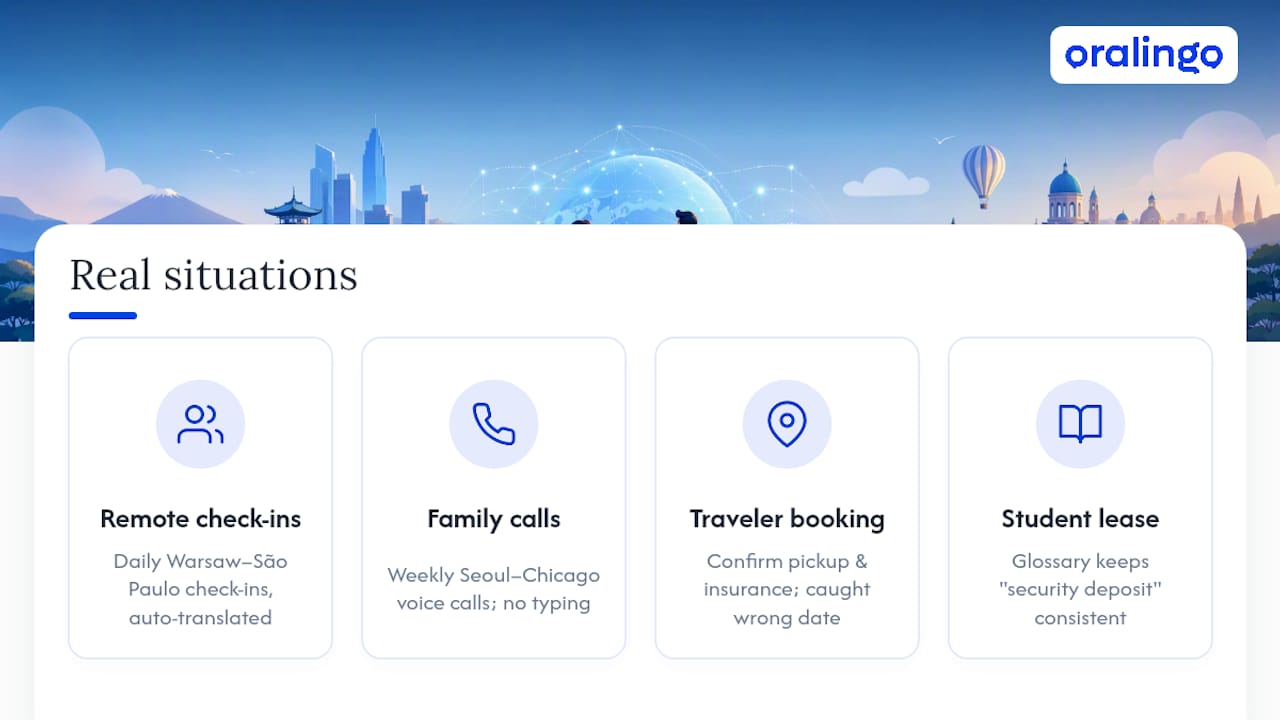
A remote employee based in Warsaw, working with a manager in São Paulo, uses pre-delivery translation daily for quick check-ins, project updates, deadline confirmations, without either person switching between typing in their own language and pasting it into a separate translator app. The message just arrives already translated.
A multilingual family with a grandmother in Seoul and grandchildren in Chicago leans on hands-free voice mode for weekly calls. Typing was always the barrier before, especially for a grandmother less comfortable with a smartphone keyboard. Voice mode removes that friction entirely.
A traveler booking a rental car in a country where they don't speak the local language uses text translation to confirm pickup times and insurance details with the rental agency, catching a mistranslated date before it became a real problem at the counter.
A student studying abroad negotiating an apartment lease uses a glossary feature to make sure terms like "security deposit" and "lease term" translate consistently across a multi-message exchange with a landlord, rather than shifting phrasing message to message in ways that could create confusion over the actual terms.
Each of these cases shares a pattern: the translation problem was narrow, personal, and time-sensitive, exactly the profile a one-to-one pre-delivery app is designed to solve, rather than the broader, multi-speaker challenge a meeting platform would face.
Keeping the Conversation Natural Despite Translation Delay
Even a fast translator introduces some delay, and how you handle that gap matters more than shaving off another quarter-second of processing time.
Short messages translate faster and more accurately than long ones, so break up your thoughts instead of sending a wall of text. This also gives your contact smaller, easier chunks to read in their own language. In voice mode, natural pauses between sentences give the system a clean point to translate, while talking in one continuous stream forces it to guess where one thought ends and the next begins, which is part of why progressive transcription paired with streamed audio produces a smoother result than waiting for a full recording to finish.
Resist the urge to send a second message before the first one finishes translating. It's a small habit, but it's one of the most common ways conversations get confusing, with translated replies arriving out of order. If a delay does happen, a simple line like "one sec, translating" does more for the conversation than silence does. Your contact isn't bothered by a short wait, they're bothered by an unexplained one.
A Simple Five-Minute Pilot Worth Running Yourself
Skip the reviews and run your own test. Pick one real, short use case, confirming a dinner reservation, asking your partner's parent a simple question, and run through the timed tests from earlier in this article: an idiomatic phrase, a two-way reply, one glossary term. Note what breaks.
Success looks like this: your contact understood you without asking you to repeat yourself, and nothing embarrassing got lost in translation. Write down what worked and what didn't, then adjust your glossary and try again the next day. Two or three short pilots tell you more than any spec sheet.
— Poul
Try Oralingo for Your Next One-on-One Conversation
This type of app is built specifically for the job this article covers: private, one-to-one text and voice conversations where you need translation to happen before the other person ever sees or hears your message. It translates messages before they display, runs a hands-free voice mode for calls where typing isn't practical, supports many languages, and keeps conversations end-to-end encrypted.

Getting started takes less time than reading this article did. Download the app, then run the same pilot outlined above: pick a short real conversation, test a couple of idiomatic phrases, confirm a glossary term with a name or job title you use often, and see how it feels on your own phone with your own contact. For a closer look at how the translation workflow handles business terminology and glossaries specifically, this practical guide to business chat translation walks through real examples. If audio quality on your end is part of what you're testing, especially for hands-free calls, Audome's audio collaboration tools are worth a look for managing microphone setup and call quality.
Ready to talk to someone in another language without switching apps or waiting on a translator? Start with Oralingo and see what a five-minute pilot tells you.
Sources
For readers who want the engineering and research detail behind the recommendations above:
- Real-Time Multilingual Chat Translator (ICISS 2026 proceedings)
- How Sanas built an instant language translation app with Expo
- OpenAI realtime translation developer docs