
The fastest way to share daily life with a partner who speaks a different language is to set up a private real-time translation workflow: install a pre-delivery translation app, invite your partner, pick your languages, and turn on hands-free voice. You can be chatting naturally quickly.
Here is what to do right now:
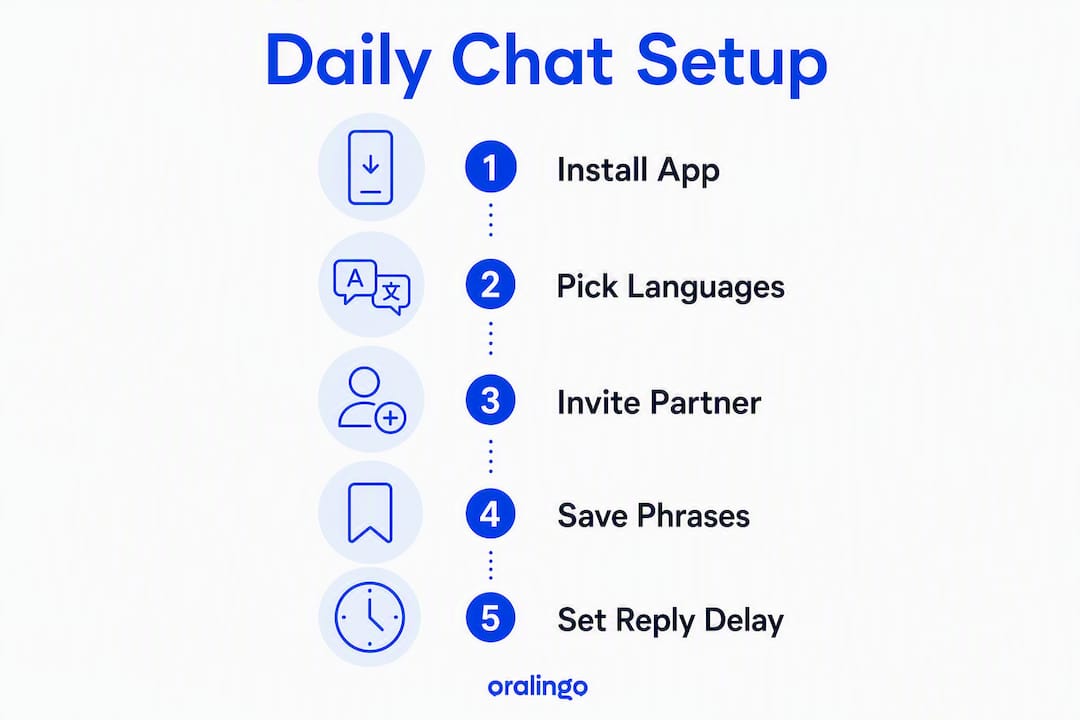
- Install Oralingo on your phone (iOS or Android). It translates messages before they display, so conversations feel natural, not interrupted.
- Invite your partner through the app and set each person's primary language.
- Enable hands-free voice mode so you can talk out loud and hear responses without typing.
Oralingo claims a 99% accuracy rate and protects every conversation with end-to-end encryption, so your daily check-ins stay between you two. Contributor Poul walks through the practical tips below.
Pro Tip: Before your first real conversation, send a test message in your own language and confirm your partner sees it correctly translated. Thirty seconds of testing saves a lot of confusion later.
Table of Contents
- How do you set up a translated daily chat in minutes?
- How should you write and speak so translation stays accurate?
- How do you build a shared emotional vocabulary you both trust?
- What privacy and security settings should you check every day?
- How do you use hands-free voice mode naturally?
- What are the most common translation problems and how do you fix them?
- What do daily routines look like when you share life across languages?
- When should you stop relying on instant translation?
- Key Takeaways
- The small rituals that actually change things
- Oralingo makes this workflow simple from day one
How do you set up a translated daily chat in minutes?
Getting started takes five to ten minutes if you follow this order.
- Download Oralingo from the App Store or Google Play and create your account.
- Invite your partner using their phone number or in-app link.
- Select primary languages for each of you inside the conversation settings.
- Confirm pre-delivery translation is on so messages arrive already translated, not in the original language.
- Enable hands-free voice mode for spoken exchanges.
- Set your register preference (formal or informal) to match how you naturally talk. Languages like Japanese and Spanish carry very different weight depending on register, and missing this setting can make messages sound cold or accidentally rude.
- Toggle notification quiet hours if you and your partner are in different time zones, so late-night messages do not wake anyone up.
After setup, save three to five phrases you use every day ("Good morning, how did you sleep?" is a good start). That small phrasebook cuts typing time and keeps your tone consistent.
Pro Tip: Set a default reply delay of five to ten seconds on voice messages. It gives the translation engine time to process a full thought before playback, which feels much smoother than hearing a partial sentence.

How should you write and speak so translation stays accurate?
The way you phrase a message matters as much as the app you use. Writing like you would explain something to a new learner — short, direct sentences, no idioms. This produces noticeably better results.
Follow these rules:
- Use short sentences. One idea per sentence. "I am tired tonight" translates cleanly. "I'm just so wiped out, you know?" often does not.
- Avoid idioms. Phrases like "it's raining cats and dogs" or "break a leg" fail direct translation almost every time.
- Flag proper names. Write [Maria] or [Brooklyn] so the app knows not to translate them.
- Label your tone. Add a brief marker at the start: [gentle], [serious], or [joking]. It tells the translation engine what register to preserve.
- Add a context line for complex messages. One sentence of background ("This is about our plans for Saturday") helps the engine pick the right words.
Before: "Don't flip out, but I think we need to talk about money." After: "[Gentle] I want to talk about our budget. Can we find a good time this week?"
The second version translates accurately in almost any language. The first one is a guessing game for any translation engine.
Pro Tip: For sensitive messages, use back-translation: paste your translated output back into the app and translate it into your original language. If the meaning holds, you are good to send.
How do you build a shared emotional vocabulary you both trust?
Literal translation flattens emotion. A word that means "I am frustrated" in English might land as "I am angry" in another language, which changes everything. Documenting a shared emotional vocabulary reduces recurring misunderstandings more effectively than ad hoc clarifications.
Here is a simple process:
- List 8–12 emotional states you use regularly: apology, reassurance, request for space, gratitude, frustration, excitement, worry, affection.
- Agree on exact phrasing in both languages for each one. Write it down together.
- Save those phrases as shortcuts in your app or in a shared note.
- Import them into your chat app's saved-phrase library so either of you can pull them up in one tap.
- Review the list monthly. Relationships evolve, and so does the language you need.
"What does this mean to you?" is more useful than "Do you understand?" Ask it after any message that carries real emotional weight. It confirms intent, not just comprehension.
For cross-cultural couples, this phrasebook becomes a relationship asset. An agreed phrase for "I need some time to think" prevents a lot of silence from being misread as anger.
Pro Tip: Map your repair language first. The phrases you need during a small conflict ("I didn't mean it that way" / "Can we start over?") are the ones that matter most under pressure.
What privacy and security settings should you check every day?
Your daily conversations deserve the same protection as your financial data. Run through this checklist when you set up, and revisit it whenever you change devices.
- Confirm end-to-end encryption is active. In Oralingo, it is on by default for every conversation.
- Review who has access to your device. A shared phone or tablet is a real risk for private chats.
- Disable cloud transcripts if your phone's backup service saves chat logs to a shared account.
- Check contact permissions. Only the people you invite should be able to reach you inside the app.
- Screenshot risk is real. Either partner can screenshot a translated message. Agree early on whether that is acceptable.
- Revoke sessions immediately if your phone is lost or you used a shared device. Most apps let you sign out all sessions remotely.
Auto-backup settings on both iOS and Android can silently upload chat content to cloud storage. Check Settings > iCloud (or Google One) and confirm your messaging apps are excluded if privacy is a priority.
Pro Tip: Use a strong, unique PIN or biometric lock on your phone. The best app-level encryption means nothing if someone picks up your unlocked device.
How do you use hands-free voice mode naturally?
Live translation is now built into many phones and earbuds, making hands-free conversation genuinely practical for daily use. Getting the rhythm right takes a little practice.
Do:
- Speak in short turns. Finish one complete thought, then pause.
- Announce sensitive topics before you start. "I want to talk about something that bothered me today" gives your partner a moment to prepare.
- Confirm register before a long conversation. "I'm going to speak casually, okay?" prevents formality mismatches.
Don't:
- Talk over each other. Overlapping speech confuses the engine and produces garbled output.
- Rush through emotional content. Slow down for anything that matters.
- Assume silence means agreement. Pause and ask.
A quick example: You start a morning check-in with "How did you sleep?" The app translates, your partner responds in their language, and you hear it in yours. The conversation flows. Then you say, "[Gentle] I want to share something that made me happy yesterday." That tone marker keeps the translation warm, not clinical.
Pro Tip: Toggle between formal and informal register per conversation, not per app. A call with your partner's parents needs a different setting than your morning check-in.
What are the most common translation problems and how do you fix them?
| Problem | Quick Fix |
|---|---|
| Tone sounds too formal | Add [informal] or [casual] at the start of your message |
| A name got translated | Wrap it in brackets: [Maria], [Tokyo] |
| Slang lost its meaning | Rephrase as a plain description; add [joking] if it was humor |
| Partial translation cuts off | Switch from streaming to full-message delivery in settings |
| Meaning is unclear | Send: "Can you tell me what you understood from that?" |
When a text exchange is going in circles, switch channels. Translation tools work well for simple daily exchanges; serious or emotional conversations benefit from richer channels like video calls where tone and facial expression fill in the gaps.
Quick clarification templates you can copy into chat:
- "I want to make sure I said that right. What did that message mean to you?"
- "Let me try again: [rewritten version]."
- "Can we switch to a voice note for this one?"
What do daily routines look like when you share life across languages?
Real-time translation works best when it is woven into predictable moments. Here are templates you can use today.
- Morning check-in: "Good morning! I slept well. How about you? I'm thinking of you." (Save this as a shortcut.)
- Grocery/logistics: "Can you pick up milk and bread? I'll be home by 7." (Plain, short sentences translate perfectly.)
- Parenting handoff: "She ate lunch, napped 90 minutes, and needs her medicine at 4." (Factual lists are translation-friendly.)
- Affection: "I miss you today. I can't wait to talk tonight." (Simple and clear.)
- Micro-conflict repair: "[Gentle] I think there was a misunderstanding. Can we talk about it?"
For recurring tasks, combine saved phrases with calendar invites. A shared Google Calendar event with a translated note ("Doctor appointment, Tuesday 3 PM") removes the need to re-explain logistics every week. For multilingual relationship communication, building these small rituals is what turns translation from a tool into a habit.
A two-line daily check-in sent at the same time each day builds closeness faster than occasional long messages. Consistency matters more than length.
When should you stop relying on instant translation?
Automated translation is excellent for daily life. It is not the right tool for every situation.
Stop and get human help when:
- Legal or contractual matters are involved. A mistranslated clause in a lease or visa document has real consequences.
- Medical conversations require precision. Symptoms, dosages, and diagnoses need a certified medical interpreter.
- Major relationship discussions are at stake. A conversation about separation, finances, or family decisions deserves a bilingual mediator, not an app.
- Complex cultural negotiations are happening. Nuance that depends on cultural context often gets lost.
To decide whether to escalate, ask yourself four questions: Is this significant? Are the consequences hard to reverse? Is the emotional intensity high? Does it require legal precision? If you answer yes to two or more, bring in a human.
When you do hire a professional interpreter, prepare a one-paragraph brief: the topic, the languages, the relationship context, and any sensitive terms. It saves time and improves accuracy.
Pro Tip: Keep a short list of bilingual contacts (a friend, a community organization, a professional service) so you are not searching for help in the middle of a stressful moment.
Key Takeaways
Real-time pre-delivery translation, combined with a shared emotional phrasebook and end-to-end encryption, is the most reliable daily workflow for partners who speak different languages.
| Point | Details |
|---|---|
| Set up quickly | Install the app, invite your partner, pick languages, and enable pre-delivery translation and voice mode. |
| Write for the engine | Use short sentences, flag names in brackets, and label tone to keep translations accurate and warm. |
| Build a shared phrasebook | Agree on 8–12 emotional phrases in both languages and save them as shortcuts in your chat app. |
| Check privacy settings | Confirm end-to-end encryption, disable cloud backups of chats, and revoke sessions on lost devices. |
| Oralingo as your daily tool | Oralingo's pre-delivery translation, hands-free voice, 100+ languages, and E2EE cover the full workflow described in this guide. |
The small rituals that actually change things
Most people focus on finding the right app. The bigger shift is realizing that the ritual matters more than the technology. A two-line morning message sent at the same time every day builds more closeness than a perfectly translated paragraph sent whenever you remember.
What I have noticed, thinking through how cross-language couples actually communicate, is that the saved phrasebook is the most underused feature in any translation app. People spend time tweaking settings and almost no time agreeing on what "I need space" or "I'm not upset, just tired" actually means in both languages. That agreement, documented and saved, is what prevents a translation engine's slightly-off word choice from turning a neutral message into a perceived slight.
The other thing worth saying plainly: translation apps are not a substitute for effort. They remove the language barrier; they do not remove the need to listen carefully, ask good questions, and check in on meaning. Use the confirmation question "What does this mean to you?" regularly, not just when something goes wrong. It is a habit that keeps communication honest.
For more on building intimacy across languages, the Oralingo blog has deeper guides on how real-time translation supports romantic communication worth reading alongside this one.
Oralingo makes this workflow simple from day one
Coordinating daily life across languages is hard enough without worrying about whether your app is private, accurate, or fast enough to keep up with a real conversation. Oralingo is built specifically for that problem.

Here is what you get:
- Pre-delivery translation: messages arrive already translated, so the conversation flows without interruption.
- Hands-free voice mode: talk naturally without typing.
- 100+ languages supported with a claimed 99% accuracy rate.
- End-to-end encryption on every conversation, by default.
- Saved phrasebook to store your shared emotional vocabulary.
There is a free basic tier to try the core features, and a paid subscription unlocks unlimited messaging and premium settings. No complicated setup, no long-term lock-in.
Download Oralingo and send your first translated message today. Your partner does not need to speak your language. You just need the right tool.