
Yes, you can get instant, private translation for one-on-one sales chats, in both text and voice. The catch: text feels close to real-time at 200 to 500 milliseconds, while voice-to-voice conversations usually run 1.8 to 3 seconds end to end. That gap shapes almost every decision you make below, and it is why Oralingo leans on pre-delivery text translation as its core strength.
TL;DR:
- Text chat translation typically feels near-instantaneous at around 200 to 500 milliseconds, while voice-to-voice exchanges usually take 1.8 to 3 seconds end to end.
- Most translation systems route common messages through fast, inexpensive machine translation, escalating to large language models only for low-confidence or ambiguous sentences.
- Critical elements like contract terms and legal language are best kept in text form and verified directly to avoid translation errors during sales discussions.
- Setting up translation involves choosing both languages, enabling hands-free voice mode, and confirming privacy settings, with testing recommended before live calls.
- Heavy slang, accents, and industry jargon can challenge translation accuracy, so maintaining glossaries and verifying key numbers verbally remains essential.
Table of Contents
- How Does Sales Chat Translation Actually Work?
- Which Translation Mode Fits Which Sales Moment?
- How Do You Set Up Chat Translation for Private, Natural Conversations?
- Where Does Translation Accuracy Break Down?
- What Can You Do Right Now to Improve Your Setup?
- Why Oralingo Fits Private Sales Chat Translation
- A Practical Take on Translation in Sales
- Try Oralingo for Your Next Sales Conversation
- Sources
- FAQ
How Does Sales Chat Translation Actually Work?
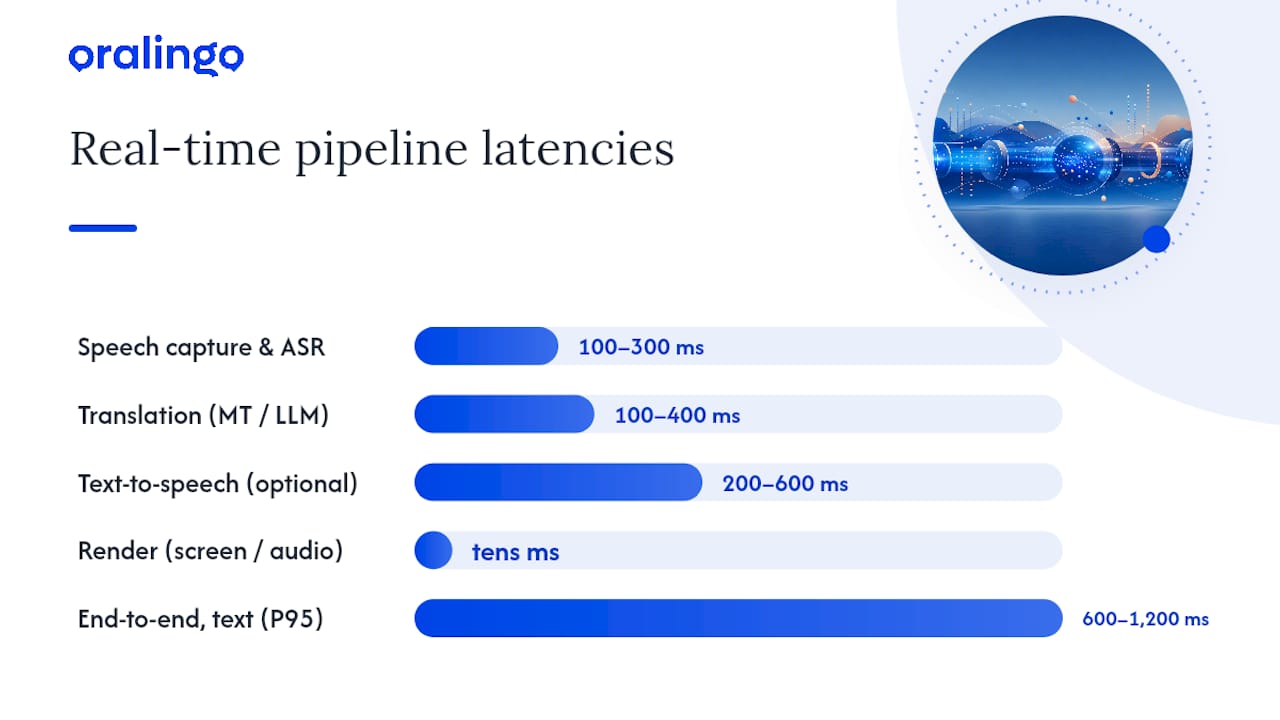
Every real-time translation exchange follows the same basic chain: capture, speech recognition, machine translation (sometimes handed to an LLM), optional text-to-speech, then render on screen or through your headset. Nothing skips a step. The differences between a smooth conversation and a laggy, frustrating one come down to how fast each stage runs and how the app hides the wait.
Most production systems route the bulk of your messages through a dedicated machine translation model because it is fast and cheap. Only the sentences the system flags as low confidence, slang-heavy, or ambiguous get kicked over to a large language model for a second pass. That selective routing keeps the whole system fast without sacrificing quality on the tricky lines.
Here is roughly what each stage costs you in time, based on current production benchmarks:
| Pipeline stage | Typical latency |
|---|---|
| Speech capture and streaming ASR | around 100 to 300 milliseconds |
| Translation (MT or LLM re-run) | around 100 to 400 ms |
| Text-to-speech (voice mode only) | around 200 milliseconds to 600 milliseconds |
| Render on screen or through audio | a few tens of ms |
| End-to-end, text captions (P95) | about 600 to 1,200 milliseconds |
| End-to-end, speech-to-speech (P95) | approximately 1.8 to 3 seconds |
A few things worth knowing before you rely on any of this for a live sales call:
- Text chat almost always feels faster than voice, because it skips the text-to-speech stage entirely.
- The 200 to 500 ms target for message delivery is what makes a chat feel like a real conversation instead of a walkie-talkie exchange.
- Voice-to-speech mode adds a second wait, since the system has to translate, then generate spoken audio, before you hear anything.
- End-to-end P95 figures mean 95% of exchanges land inside that range. The remaining 5% will feel noticeably slower.
If you are reading a translated caption while someone talks, the delay barely registers. If you are waiting on a translated voice response before you can reply, plan for a beat of silence. That is normal, not broken.
Which Translation Mode Fits Which Sales Moment?
Not every part of a sales conversation needs the same tool. Matching the mode to the moment saves you from both slow, clunky exchanges and costly misunderstandings.
- Cold outreach messages: Text-to-text. You have time to read carefully before you send, and there is no pressure to respond instantly.
- Small talk and rapport building: Speech-to-speech or hands-free voice mode. Natural back-and-forth matters more than word-for-word precision here.
- Discovery calls: A mix. Use voice for the conversation itself, but glance at the live captions when a client mentions a product name, quantity, or technical spec.
- Price and contract terms: Text-to-text, always. You want the number in writing, not filtered through a translated voice you heard once.
A little etiquette goes a long way too. Tell the other person you are using a translation app. Most people appreciate the heads-up, and it explains any small delay. When numbers, dates, or contract terms come up, read the translated text back and confirm it before you move on.
Pro Tip: Save the legal or highly technical language for text chat, even mid-call. It only takes a few seconds to switch, and it gives you a written record you can both refer back to later.
How Do You Set Up Chat Translation for Private, Natural Conversations?
Getting the setup right takes a few minutes, and it pays off every time you open the app for a real conversation.
- Pick both languages before you start. Set your language and your contact's language so the app does not have to guess.
- Turn on hands-free voice mode if you expect a spoken conversation rather than typed messages.
- Check the privacy and encryption toggle. On-device translation keeps your text and audio local, while server-side translation sends content to a vendor. Know which one you are using, and favor end-to-end encrypted apps for anything sensitive.
- Confirm tone preservation is on, if the app offers it, so a casual message does not come out sounding stiff or overly formal in translation.
On the interface side, look for an app that shows you the original message first, then updates it with the translation moments later. That pattern keeps the conversation moving instead of freezing the screen while translation happens in the background. Partial text should stay visible and stable rather than flickering or getting erased and rewritten mid-sentence.
Pro Tip: Test the setup with a friend before a real sales call. Send a few messages back and forth, including one with a number and one with slang, and see how the app handles both.
Where Does Translation Accuracy Break Down?
Real-time translation handles everyday conversation well. It struggles more with slang, heavy accents, brand names, and industry jargon. A phrase your client considers ordinary might not have a clean equivalent in the other language, and the app has to guess.
Common failure points include regional slang, fast or accented speech, technical product terms, and legal phrasing. None of these are rare in sales conversations, which is exactly where the stakes are highest.
A few mitigation habits fix most of this:
- Keep a short glossary of your product names and key terms, translated once and reused every time.
- Build a few phrase templates for your most common opening lines and price statements.
- Verify any critical number, date, or commitment out loud before ending the call.
- Route contracts and legally binding language to a human translator, not a live chat tool.
By the numbers: dedicated machine translation typically returns results in 100 to 400 milliseconds per sentence, fast enough for real conversation, but that speed comes from statistical pattern matching, not human judgment. Automated tools remain genuinely useful for everyday conversation, though heavy accents and specialized terms still trip up even strong systems. That is also the point where learning even basic phrases in the other language, rather than leaning on translation alone, still pays off in ways researchers connect to language learning.
What Can You Do Right Now to Improve Your Setup?
You do not need special training to get noticeably better results from chat translation. A few small habits make the biggest difference.
- Write a mini-glossary. List your five or six most-used sales phrases and product terms, and check how they translate before your next call.
- Run a two-minute test call with a colleague or friend who speaks the target language, just to confirm your voice mode sounds clear and the timing feels natural.
- Check your device setup. Pair a headset or earbuds, find a quiet room, and confirm you have a strong network connection. Weak Wi-Fi is the most common cause of translation lag, not the app itself.
- Grant microphone and notification permissions ahead of time so nothing interrupts you mid-conversation, and charge your device before an important call.
Small prep, real payoff. A ten-minute test run beats discovering a translation glitch three sentences into a price negotiation.
Why Oralingo Fits Private Sales Chat Translation
Oralingo translates your messages before they even hit the screen, so you and your contact both see natural, ready-to-read text instead of a raw first draft. That pre-delivery approach is built specifically for one-on-one conversations, not group chats or customer service queues.
Here is what backs that up:
- Support for a large number of languages, with high accuracy on everyday conversation.
- Hands-free voice mode for when you would rather talk than type.
- End-to-end encryption on conversations, helping keep pricing discussions and client details private.
If you want to go deeper on any of the mechanics covered here, Oralingo's own blog has more. Read about the latency and streaming workflow behind chat translation, or see how teams combine AI translation with human review for higher-stakes conversations.
A Practical Take on Translation in Sales
Adopt chat translation the moment language is the only thing standing between you and a deal. It handles outreach, small talk, and most discovery calls well. Keep a human translator in the loop for signed contracts and anything with legal weight, no exceptions there. And do not mistake convenience for connection. Translation gets you into the conversation faster, but learning even a handful of words in your client's language still builds trust that no algorithm delivers on its own.
— Poul
Try Oralingo for Your Next Sales Conversation
Oralingo is built around one job: translating your one-on-one conversations before they ever hit the screen, so what you read feels natural instead of machine-generated. You get hands-free voice mode when you would rather talk than type, support for over 100 languages, and end-to-end encryption on every chat, so pricing details and client information stay between you and the other person.

If you are closing deals across languages and tired of choppy, delayed translation apps built for group chats instead of real conversations, this is worth five minutes of your time. Head to Oralingo and try it on your next call.
Sources
- What is live translation and how it works — T-Mobile Dialed In
- Real-Time Language Translation: 2026 Build Playbook — Forasoft
- Komando
FAQ
Is Sales Chat Translation Really Private?
It depends on the app's architecture. On-device translation keeps your audio and text local, while server-side processing sends content to a vendor. Oralingo uses end-to-end encryption on every conversation, so your messages stay private between you and the other person.
How Accurate Is Real-Time Translation for Sales Conversations?
It handles everyday conversation well but can stumble on slang, heavy accents, and industry jargon. Oralingo reports a 99% accuracy rate across its supported languages, though critical contract language should still go through human review.
Does Sales Chat Translation Work for Voice Calls, Not Just Text?
Yes. Voice-to-speech translation typically takes 1.8 to 3 seconds end to end, noticeably slower than text, which lands closer to 200 to 500 milliseconds. Oralingo's hands-free voice mode covers spoken conversations for readers who would rather talk than type.
What Devices Support Live Sales Chat Translation?
Most current smartphones support live translation features, and many built-in conversation modes now handle real-time translation across dozens of languages. A stable network connection and a decent headset matter more than the specific phone model.
How Much Does Oralingo Cost?
Pricing details and plan options are available directly on the Oralingo site rather than published here.