
Use an app or in-chat pre-delivery translator with automatic language detection to translate mixed-language chats instantly. The fastest fix pairs a dedicated real-time chat translator (like Oralingo) with hands-free voice mode for spoken conversations, so every message flips to your language before it ever hits your screen. Want to see it work in five minutes? Jump to the quick test below.
TL;DR:
- Automatic detection of multiple languages in a conversation is essential to handle code-switching reliably without manual adjustments.
- Pre-delivery translation eliminates the need for tap-to-translate actions, making continuous, natural conversations more seamless.
- Hands-free voice translation is most effective when latency is low enough to enable real-time spoken exchanges with minimal delay.
- Permissions, privacy settings, and accurate language detection are common barriers; skipping these steps often causes setup failures.
- Machine translation is sufficient for routine communication but may struggle with idioms, sarcasm, and culturally loaded expressions, requiring human review.
Table of Contents
- What Actually Works to Translate Mixed Language Chats
- How to Set Up Reliable Chat Translation in Under 10 Minutes
- What to Look for in a Mixed-Language Chat Translator
- What Oralingo Actually Claims to Do for Mixed-Language Chats
- When Machine Translation Is Enough, and When It Isn't
- Test Oralingo on Your Own Mixed-Language Chats
- Sources
- FAQ
What Actually Works to Translate Mixed Language Chats
Mixed-language chats break most translation tools because they're built to detect one language at a time. Your cousin texts in Spanish, then drops an English phrase, then switches back mid-sentence with an emoji thrown in. That's called code-switching, and it's normal in bilingual and multilingual conversations. The tools you use need to handle it without asking you to pick a language first.
Here's what your options actually look like, from simplest to most capable.
1. Message-level translation (long-press to translate). Most major chat apps let you long-press a message and tap "Translate." It works fine for a single, clean sentence in one language. It falls apart the moment a message mixes two languages in the same line, because the app has to guess which language dominates, and it often guesses wrong. You'll see this most in group chats where people slip between languages depending on who they're replying to.
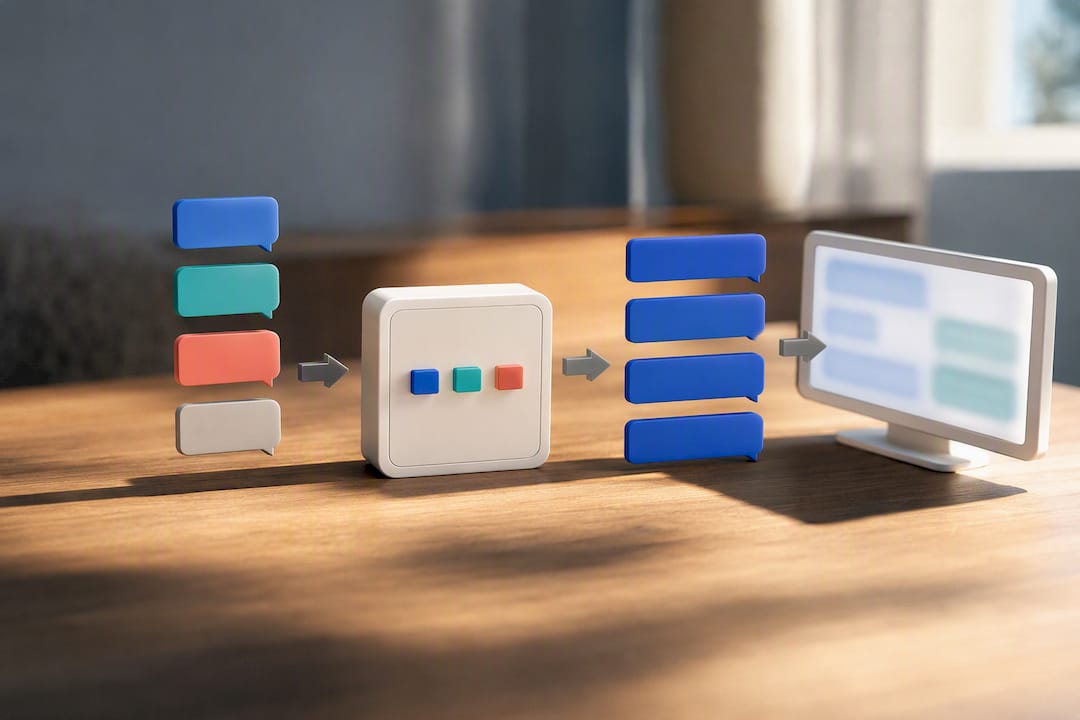
2. Pre-delivery translation. This is a different approach entirely. Instead of you tapping to translate after a message lands, the translation happens before the message displays on your screen. You see it already in your language, and you never have to manage a workflow. This matters more than it sounds. Every long-press action is a tiny interruption, a break in the rhythm of a conversation. Pre-delivery translation removes that interruption completely, which is the core reason Oralingo builds around it instead of a translate-on-demand button.
3. Hands-free voice translation. For spoken mixed-language conversations, voice mode listens, detects the language automatically, and speaks the translation back, often without you touching your phone. This is the workflow that matters for a phone call with a relative overseas or a voice message from a colleague who switches languages when they get excited or frustrated. Typing translations back and forth during a live call just doesn't work in practice.
4. Browser extensions and keyboard tools. If you're chatting through a web interface (a browser-based messaging platform or a customer support widget), a tool like the AI Chatbot Component Showcase provides useful components when integrating translation into chat UIs without switching apps. It handles websites, PDFs, and even meeting audio. This is a reasonable fit for desktop-heavy workflows, but it's not built for a phone conversation happening in a native chat app.
Here's how each approach handles a real mixed-language line. Say a message reads: "Hey, ¿puedes revisar el archivo? Thanks so much!"
- A message-level translator often catches the Spanish and misses that "Thanks so much" was already in English, sometimes translating text that didn't need it.
- A pre-delivery translator reads the whole message, identifies both languages, and hands you a single clean sentence: "Hey, can you check the file? Thanks so much!"
- A voice tool handling the same line aloud needs to detect the switch mid-sentence and adjust its output in real time, which is a harder technical problem and where latency differences between apps show up the most.
Pro Tip: If a chat partner constantly code-switches between the same two languages, set both as your target languages in the app's settings instead of one. This stops the tool from having to guess and cuts down on mistranslated fragments.
For quick one-off translations of a single foreign phrase, message-level translate is fine. For an ongoing relationship, a work thread, or a family group chat where languages blend constantly, a dedicated pre-delivery tool saves you from babysitting every message.
How to Set Up Reliable Chat Translation in Under 10 Minutes
Getting this right takes less time than deciding what to eat for lunch. Follow this order and you'll avoid the most common setup mistakes.
- Check platform support first. Confirm your chat app allows accessibility permissions or has a compatible translation feature. Some platforms restrict what third-party apps can read.
- Grant the permissions the app actually needs. Microphone access for voice mode, notification access to catch incoming messages, and accessibility permissions for pre-delivery translation to work across other apps. Skipping one of these is the number one reason setups fail silently.
- Turn on automatic language detection. Don't manually set a single source language if your conversations involve more than one. Detection should run per message, not per conversation.
- Set your target language (or two, if you're bilingual). This is where you tell the app what you actually want to read.
- Enable pre-delivery translation if the app offers it. This is the setting that removes the tap-to-translate step entirely.
- Turn on hands-free voice mode and run a latency check. Send a short spoken phrase and time the response. A 15-minute voice chat test is enough to know if latency will bother you on a real call.
- Run three test messages. One in a single foreign language, one mixing two languages in the same sentence, and one with slang or an emoji. Compare what comes back against what you meant.
- Review the privacy settings before your first real conversation. Confirm whether translation happens with end-to-end encryption, and check what the app's privacy policy says about message retention.
A meaningful share of translation complaints trace back to skipped permissions, not bad translation engines. If your setup takes longer than 10 minutes, something in that list got skipped.
Pro Tip: Test with a message that includes an idiom, not just vocabulary. "Break a leg" translated literally into most languages means nothing, and it's the fastest way to spot whether a tool actually understands context or just swaps words.
What to Look for in a Mixed-Language Chat Translator
Not every translation app is built for the same job. Here's what separates a tool that handles mixed-language chats well from one that just handles single-language text.
- Automatic detection across 100+ languages, not a manual dropdown you set once and forget.
- Pre-delivery translation, so messages arrive already translated instead of requiring a tap.
- Hands-free voice mode for spoken conversations, with low enough latency that a call still feels natural.
- End-to-end encryption, so the convenience of translation doesn't come at the cost of privacy.
- Tone and context preservation, so a casual message doesn't come out sounding like a legal document.
- Custom language and voice settings, useful when you regularly switch between the same two or three languages.
- A usable free tier, so you can test real conversations before committing to a subscription.
Latency deserves special attention. A text message translated a second late barely registers. A voice call translated a second late feels like talking over a bad phone connection. If you're evaluating tools for spoken conversations, that delay matters more than almost any other feature on this list.
Multi-engine tools are worth knowing about too. Platforms like Molixa compare outputs across engines and attach confidence scores per sentence, which helps when you're double-checking a line that seems off. Open-source options like multranslate route text through several translation backends at once for developers who want that kind of control. Neither is built as a chat app, but they're useful for spot-checking a translation that a chat tool got wrong.
Pro Tip: If cost is a factor, check whether the free tier covers real usage or just a demo. A 5,000-character limit sounds generous until you realize a busy group chat can burn through it in a single afternoon.
What Oralingo Actually Claims to Do for Mixed-Language Chats
Oralingo builds its entire approach around one idea: you shouldn't have to manage translation at all. Messages translate before they display, so a mixed-language conversation just reads naturally on your screen, in your language, without a translate button anywhere in sight.
Here's what the app claims, straight from its own product pages:
- Support for over 100 languages with automatic detection per message.
- Near-instant pre-delivery translation, meaning you read the translated version, not the original, by default.
- A hands-free voice mode for spoken conversations, so you can talk naturally without typing anything.
- Oralingo claims high accuracy on translations.
- End-to-end encryption on every conversation, so translated chats stay private between you and the other person.
In practice, this plays out in a few common situations. A one-to-one chat with a partner who speaks a different first language gets translated line by line, with tone preserved, so a joke still reads like a joke instead of a flat statement. A family group chat where grandparents write in one language and grandkids reply in another handles the code-switching automatically, translating each message based on what it detects, not what the last message was written in. A voice call with a business contact overseas runs through hands-free mode, letting both people speak naturally while the translation happens in the background.
Oralingo's blog covers the technical side of this in more depth, including how private pre-delivery translation works for one-to-one Messenger chats and a broader breakdown of real-time chat translation for anyone who wants to understand what's happening under the hood.
When Machine Translation Is Enough, and When It Isn't
Automated translation handles the vast majority of daily chat traffic without a hitch. Coordinating dinner plans, catching up with a friend, closing a routine work thread. None of that needs a human eye on it.
Where it gets shaky is idioms, sarcasm, and anything culturally loaded. A phrase that means one thing literally and something else entirely in context (an idiom, a piece of slang, a joke that depends on tone) is where machine translation still stumbles, mixed-language or not. Contracts, medical instructions, and legal notices belong in the same category. The stakes are too high for a "probably right" translation.
A sensible process: let the machine translate first, since it handles the bulk of the work instantly and for free. Then flag anything that reads oddly, feels flat, or seems to contradict the tone of the conversation, and get a second opinion on just that line. Multi-engine comparison tools are genuinely useful here, since seeing two or three different renderings of the same sentence tells you fast whether the machine is confident or guessing. This machine-first, human-check-second approach is roughly what most professional translators already lean on, not because automation is unreliable, but because it's efficient enough to handle everything except the sentences that truly need judgment.
— Poul
Test Oralingo on Your Own Mixed-Language Chats
Oralingo is built for exactly the situation this article covers: conversations that jump between languages mid-sentence, where a translate button just gets in the way. Instead of tapping to translate after a message lands, Oralingo shows you the translated version before you ever see the original, in text or hands-free voice.

Testing it takes about five minutes. Sign up, set your target language (or two, if your conversations regularly switch between them), and turn on pre-delivery translation along with hands-free voice mode. Then run a real mixed-language exchange with a friend, partner, or colleague. Watch three things: how fast the translation appears, whether the tone still sounds like the person who wrote it, and whether the encryption settings match what you'd expect from a private conversation. If you want to dig deeper into the mechanics first, Oralingo's blog covers testing voice chat for latency and how language detection works session to session. When you're ready to try it on a real conversation, head to Oralingo and start your first chat.
Sources
For deeper technical comparisons, Molixa covers multi-engine confidence scoring, Immersive Translate explains browser-based real-time translation, and multranslate documents a developer-focused multi-backend setup. Oralingo's blog expands on pre-delivery translation and privacy design for anyone building or troubleshooting a chat translation workflow.
FAQ
Can ChatGPT Translate a Live Conversation?
ChatGPT can translate text you paste into it, but it isn't built to intercept and translate messages in real time inside a chat app. For a live, ongoing conversation, a dedicated real-time translator with automatic detection, like Oralingo, is a more reliable fit than copying messages back and forth into a general chatbot.
How Do I Translate Multiple Languages at Once in a Chat?
Turn on automatic language detection instead of setting one fixed source language, so the app can identify each message's language independently. Apps that support pre-delivery translation apply this detection to every incoming message automatically, which handles code-switching within a single group chat without you adjusting settings mid-conversation.
Is There an App That Translates Live Conversations?
Yes. Real-time chat and voice translation apps exist specifically for this, translating spoken or typed messages as the conversation happens rather than after the fact. Oralingo, for example, offers hands-free voice mode alongside pre-delivery text translation for exactly this kind of live, ongoing exchange.
How Do I Translate a Text Message Written in a Different Language?
On most phones, long-pressing the message brings up a "Translate" option that works for a single message in one language. For messages that mix languages, use a translator with automatic detection or a pre-delivery translation app so the whole message gets read and translated as one unit instead of in fragments.