
A cross-language family chat translates messages automatically so every member reads in their own language. Your grandmother sends a voice note in Mandarin, and your cousin in Texas reads it in English seconds later. No switching apps. No copy-pasting into Google Translate. Just one conversation, flowing naturally.
The world's two largest language families, Indo-European and Sino-Tibetan, together cover more than 4.8 billion speakers. Chances are your family already spans more than one of them. Cross-language family chat is the tool that keeps you all in the same room.

Table of Contents
- What is cross-language family chat, exactly?
- How does cross-language family chat actually work?
- What features should you look for in a family chat app?
- Why do families actually use cross-language chat?
- What are the common limits of automatic translation in family chat?
- What does cross-language family chat look like in real life?
- What privacy and security features should you require?
- How do you choose the right app for your family?
- Why does a single shared chat space matter for family closeness?
- Key Takeaways
- The part most families overlook
- Oralingo fits the family chat checklist
- Useful sources and further reading
What is cross-language family chat, exactly?
A cross-language family chat is a group messaging space where translation happens before a message is displayed. You type or speak in your language. The app translates it. Every other member sees the message in their own language. The original is still there if anyone wants to check it, but no one has to.

This is different from copying a message into a separate translation tool after the fact. The translation is part of the delivery. That shift, small as it sounds, is what makes the conversation feel natural instead of labored.
How does cross-language family chat actually work?
Translation happens before or as a message is delivered, not after you read it. Here is the basic flow: you compose a message, the app detects your language automatically, sends the text or audio to a translation engine, and delivers the translated version to each recipient in their preferred language.
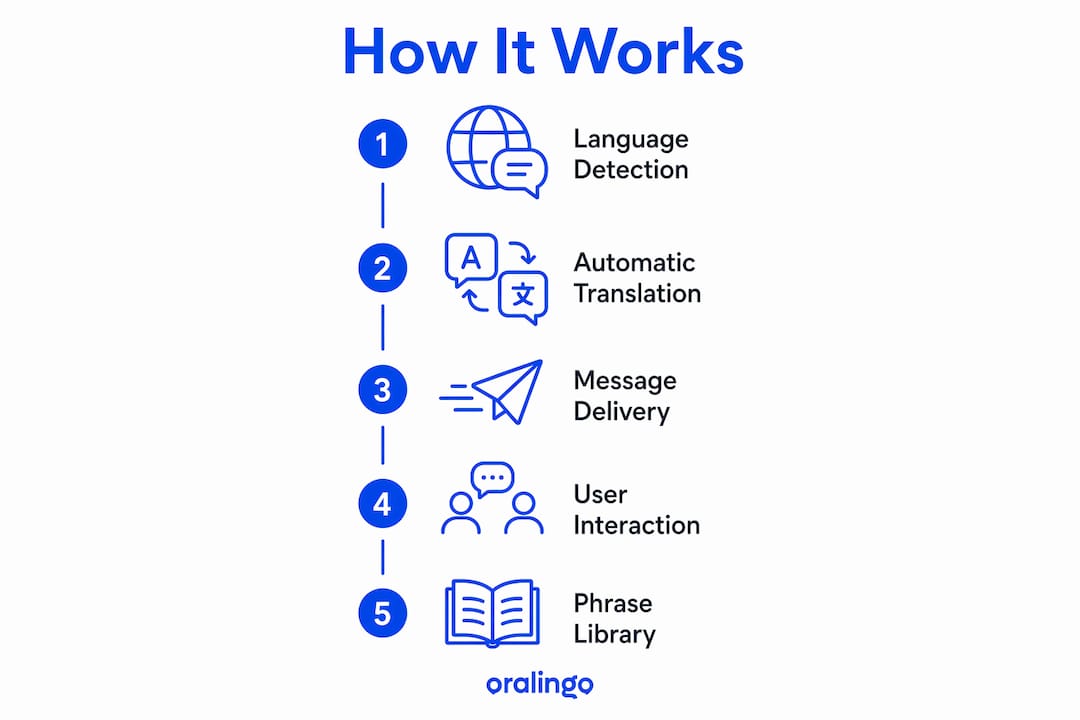
| Component | Role |
|---|---|
| Language detection | Identifies the sender's language automatically |
| Translation engine | Converts text or transcribed audio to target languages |
| Pre-delivery processing | Translates before the message appears in the chat |
| Tone/context preservation | Keeps emotional register and meaning intact |
| Voice-to-text | Transcribes voice notes before translation |
| Inline original toggle | Lets any member view the source message |
The UX patterns that work best include language badges on each message, a tap-to-reveal original, and auto-detect so no one has to manually set a language every time.
Picture this: your grandmother records a voice note in Cantonese. The app transcribes it, translates it to English and Spanish, and delivers three versions simultaneously. Your uncle in Miami reads Spanish. You read English. Grandma never had to do anything differently.
What features should you look for in a family chat app?
Not all translation chat apps are built with families in mind. These are the features that actually matter for group chats across generations:
- Instant pre-delivery translation: Messages arrive already translated. No extra taps, no waiting.
- Group-wide language support: Every member sets their own language preference. The app handles the rest.
- Voice-to-voice or voice-to-text: Critical for older relatives who prefer speaking over typing.
- Saved phrases: Common expressions ("I love you," "Call me when you land") stay accurate and personal.
- Tone and context preservation: Humor, warmth, and urgency should survive translation.
- Device compatibility: The app needs to work on both Android and iOS, across older and newer devices.
- Offline support: Useful for family members in areas with unreliable data connections.
Pro Tip: Set up a shared phrase library before your first family group call. Add names, nicknames, and recurring expressions your family uses. This alone cuts awkward mistranslations by a wide margin.
Why do families actually use cross-language chat?
The biggest benefit is not speed. It is closeness. When you stop managing language logistics, you start having real conversations again.
Research on transnational multilingual families shows that mobile messaging supports translanguaging practices, where families naturally mix languages for both practical coordination and emotional connection. These mixed-language habits, sometimes called familylects, carry identity and affection that a strict one-language rule would erase. A good cross-language chat app preserves those code-switches rather than flattening them.
Practically speaking, that means faster coordination on everyday things: scheduling a video call, sharing a recipe, confirming travel plans. It also means grandparents stay in the daily loop instead of waiting for a bilingual family member to relay messages. That inclusion matters more than most families realize until they have it.
What are the common limits of automatic translation in family chat?
Automatic translation is good. It is not perfect. Knowing the gaps helps you work around them.
- Tone loss: Sarcasm, humor, and tenderness can flatten in translation. Use saved phrases for emotionally important messages.
- Idiom errors: "Break a leg" does not translate literally. Build a phrase library for expressions your family uses often.
- Named-entity mistakes: Family nicknames and local place names sometimes get mangled. Correct them once in saved phrases.
- Script mismatches: Some apps struggle with less common scripts. Test your key language pairs before committing.
- Offline constraints: Most translation engines need a connection. Check whether the app caches anything locally.
- Privacy trade-offs: Server-side translation means your messages leave the device. More on this in the privacy section below.
Pro Tip: For sensitive messages, like medical updates or emotional conversations, tap the inline original before responding. A bilingual family member can flag a mistranslation quietly without derailing the whole chat.
The challenges multilingual families face with auto-translation are real but manageable. Simple confirmation habits ("Got it, calling you at 3?") catch most coordination errors before they cause problems.
What does cross-language family chat look like in real life?
Surprise party planning across time zones. Your aunt in Seoul coordinates with cousins in Chicago and São Paulo. Each person types in their language. Everyone reads the plan in their own. The group-wide language support feature carries this entirely.
Daily grandparent check-ins. A grandmother sends a voice note every morning. Her grandchildren receive a translated text. Voice-to-text is the feature that makes this work without asking her to change anything about how she communicates.
Recipe sharing with commentary. A family recipe thread mixes Korean, English, and Portuguese. Members add tips and memories in their own language. Tone preservation keeps the warmth in every note.
For family group trip planning, cross-language messaging removes the bottleneck of waiting for one bilingual member to translate logistics for everyone else.
What privacy and security features should you require?
Start here: if an app does not clearly state end-to-end encryption, keep looking.
Where translation is processed matters for privacy. Client-side translation keeps your messages on the device. Server-side translation sends raw text or audio off-device, where it can be logged. Most apps use server-side processing, which is fine as long as the data-retention policy is clear and short.
Questions to ask before you commit:
- Is the chat end-to-end encrypted? This should be stated plainly, not buried in a terms document.
- Where are translations processed? Client-side is more private; server-side requires a clear retention policy.
- How long are message logs kept? Shorter is better. Indefinite retention is a red flag.
- Is voice data stored after transcription? Audio files are more sensitive than text.
- Is the privacy policy written in plain language? If you need a lawyer to read it, that is a problem.
Red flags: no encryption claim anywhere, broad data-sharing clauses with third parties, and retention terms that say "as long as necessary" with no defined period.
How do you choose the right app for your family?
Run this checklist, then do a 10–15 minute family test before anyone commits.
- Confirm the app supports all your family's language pairs.
- Check that it works on every device in the group, including older phones.
- Verify end-to-end encryption is stated clearly.
- Review the data-retention policy. Look for a defined deletion period.
- Test the cost model. Free tiers often cap messages or languages.
- Ask the least tech-comfortable family member to send a message without help.
| Test | How to run it | Pass result |
|---|---|---|
| Send a text message | Type a short sentence in your language | Recipient reads it in their language instantly |
| Send a voice note | Record 10 seconds of speech | Recipient receives accurate transcription and translation |
| Check the original toggle | Tap to reveal the source message | Original appears clearly alongside translation |
| Use a saved phrase | Send a pre-saved expression | Phrase arrives exactly as saved, no mistranslation |
| Inspect the privacy page | Find and read the privacy policy | Encryption and retention terms are stated plainly |
Red flags at this stage: the privacy policy is hard to find, your key language pair is missing or produces inconsistent results on short phrases, or the oldest family member cannot figure out how to send a message without a tutorial.
For more setup guidance, the real-time translation setup guide walks through device compatibility and onboarding for older relatives step by step.
Why does a single shared chat space matter for family closeness?
A unified chat space shifts families from managing language to simply being together. Research on transnational family messaging finds that translanguaging in mobile text threads supports both phatic actions (greetings, affection, humor) and practical coordination, strengthening the family-specific language practices that carry identity across generations.
In plain terms: when the language barrier is handled automatically, families stop treating the chat as a translation task and start using it the way they use any family group, for quick hellos, shared photos, and the small daily moments that keep relationships alive.
Two things you can do right now:
- Set a daily or weekly check-in trigger so the chat stays active, not just functional.
- Allow each member to toggle between translated and original text for emotional messages, so nothing important gets lost in translation.
Key Takeaways
A cross-language family chat works best when translation is automatic, private, and invisible to the user. The goal is connection, not language management.
| Point | Details |
|---|---|
| Core definition | Pre-delivery translation lets every family member read messages in their own language automatically. |
| Top features to require | Look for group-wide language support, voice-to-text, saved phrases, and tone preservation. |
| Privacy non-negotiable | Require end-to-end encryption and a clear, time-limited data-retention policy before committing. |
| Run a family test | A 10–15 minute test covering text, voice, original toggle, and saved phrases catches most problems early. |
| Oralingo | Oralingo supports 100+ languages with pre-delivery translation and end-to-end encryption, matching the checklist above. |
The part most families overlook
Most people evaluate translation chat apps by asking "how accurate is it?" That is the wrong first question. Accuracy matters, but it is table stakes. The real question is whether the app disappears into the background so your family stops thinking about language at all.
The research on translanguaging makes this concrete. Families do not just want their words converted. They want their tone, their nicknames, their running jokes to survive the trip from one language to another. An app that translates correctly but strips warmth out of every message will get abandoned, no matter how high its accuracy score.
The other thing families underestimate is setup time. Spending 20 minutes before the first group call, adding saved phrases, setting language preferences, testing voice notes, is what separates a chat that sticks from one that gets ignored after a week. The technology is ready. The question is whether your family takes 20 minutes to configure it properly.
Oralingo fits the family chat checklist
Oralingo translates messages before they are displayed, so your family reads in their own language without any extra steps. It covers 100+ languages with end-to-end encryption on every conversation, matching the two non-negotiables from the checklist above.

Features that map directly to what families need:
- Hands-free voice mode: Speak naturally; the app handles transcription and translation.
- Pre-delivery translation: Messages arrive already translated, no taps required.
- Tone and context preservation: Warmth and humor carry across languages.
- End-to-end encryption: Every conversation stays private.
- 100+ language support: Covers the major language families your relatives speak.
Run the 10–15 minute family test plan with Oralingo. Download the app and see whether your family's key language pairs pass every check.
Useful sources and further reading
- Negotiating language in family texts (PMC) — Peer-reviewed study on translanguaging and phatic communication in transnational family messaging.
- Ethnologue: largest language families — Data on Indo-European and Sino-Tibetan speaker counts; useful context for language coverage decisions.
- Oralingo product page — Official source for feature details, language support, and subscription information.
- How Real-Time Translation Connects Across Generations — Practical setup guide for intergenerational family use and device compatibility.
- How to Translate Family Group Chat Messages Easily — Step-by-step walkthrough for configuring group chats, saved phrases, and language toggles.
- Real-Time Chat Translation Explained for 2026 — Overview of current UX patterns including inline originals, language badges, and auto-detect.
- Common Challenges Multilingual Families Face in 2026 — Analysis of real family pain points and practical mitigation strategies.
- Global Reach — ksign.co — Background on client-side vs. server-side processing and what it means for message privacy.